MailerLite Alternatives for Email Sequences
Most people running sequences on a paid MailerLite plan should stay: MailerLite's pricing page gives Comfort 50 active automations of up to 100 steps from $19 a month at 1,000 subscribers. Leave if you have outgrown Free's 250 subscribers and 3 automations of 5 steps and do not want to pay: Brevo is the default first stop, with a free plan that stores up to 100,000 contacts at 300 sends a day. Leave for ActiveCampaign if you need CRM-style branching, or for Kit if you sell products to your list. Stay if you are an EU sender who values MailerLite's EU data storage.
The reader here already uses MailerLite, or is about to choose it, for a welcome series, a nurture run after a lead magnet, or a launch sequence, with a list from a few hundred to 25,000. Prices and limits were read from each vendor's pricing page and help articles on 7 October 2026 and are linked where they are used. The editor reads pages and documentation rather than running the tools, so statements about how a feature behaves are the vendor's own, quoted or closely paraphrased.
| If the problem is... | Look first at | Because |
|---|---|---|
| Free stops at 250 subscribers | Brevo | Its free plan keeps up to 100,000 contacts and caps sends per day instead |
| Sequences need sales-style branching | ActiveCampaign | Even its entry plan lists a standard CRM beside automation |
| The list exists to sell your own products | Kit or Flodesk | Both list checkout and selling features beside their sequences |
| Funnels, course and emails should share one login | Systeme.io | Unlimited emails and 0% transaction fees on every plan |
MailerLite's three plans, limit by limit
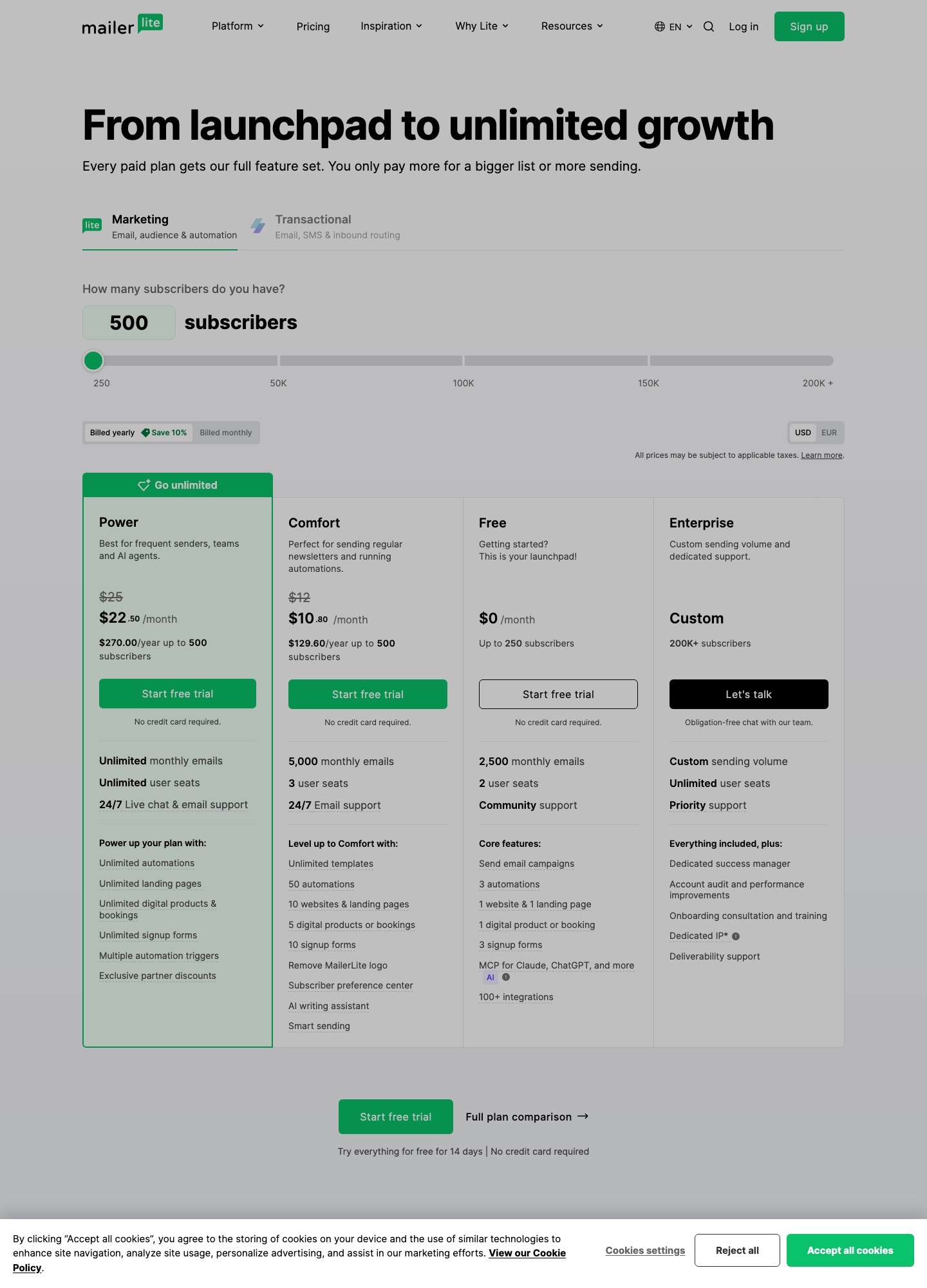
The page's headline claim is that every paid plan gets the full feature set and you pay more only for a bigger list or more sending, though the plan cards show it is not quite that simple for automation work. The numbers that matter to a sequence builder, as MailerLite's pricing page and automation page list them:
| Limit | Free | Comfort | Power |
|---|---|---|---|
| Subscribers at entry | Up to 250 | 500 (from $12) | 500 (from $25) |
| Monthly emails | 2,500 | 10 times the subscriber tier | Unlimited, fair use policy |
| Active automations | 3 | 50 | Unlimited |
| Steps per automation | 5 | 100 | 100 |
| Triggers per automation | One | One | Up to 3 (multiple triggers) |
| User seats | 2 | 3 | Unlimited |
| Landing pages and websites | 1 each | 10 | Unlimited |
| Digital products and bookings | 1 | 5 | Unlimited |
Yearly billing is shown as a 10% saving, which is why the capture reads $10.80 for Comfort where the monthly price is $12. Transactional email is not part of any of the three plans: the feature table points to MailerSend for it.
What actually pushes people off MailerLite
- A hard stop at 250 subscribers on Free. The pricing FAQ says that on a free account, once active subscribers exceed 250, "sendings will be locked (campaigns + automation)" until you upgrade or remove subscribers. Free is generous for a first list, with automation included, but it ends abruptly and takes your welcome series with it. People who do not want a bill at that moment look for a free plan that bends rather than stops.
- Comfort stops short of multi-entry automations. Comfort's 50 automations and 100 steps are plenty for sequences, but the pricing page lists multiple automation triggers under Power. The automation page says you can add up to 3 triggers to one automation, so on Comfort a nurture that should start from a form, a group join or a link click is rebuilt as separate automations that you maintain in parallel. That gets untidy as the number of sequences grows.
- The subscriber count works differently from what many expect. Billing is based on active subscribers, with a cumulative count inside each billing cycle: an address that was active at any time during the cycle counts, even if deleted later, though unsubscribed and bounced addresses do not. On a paid plan, passing your limit raises it automatically and charges your card for the next pricing tier, with a notification beforehand. A big import during a campaign can therefore move you up a tier for a month.
- Everything outside marketing email sits elsewhere. Transactional sends are a separate MailerSend product, Free's API, webhooks and MCP access are listed as limited, and Comfort has 3 seats against Power's unlimited. A small team that wants shared access and an order-confirmation email from one place hits these edges sooner than a solo creator does.
Seven tools to try, in the order a MailerLite user should try them
1. Brevo: the first stop when Free has run out and a bill is not welcome
Brevo's plans article says its free plan includes 300 daily email sends and storage for up to 100,000 contacts, with marketing automation on Free available for up to 2,000 contacts. Over a 30-day month, 300 a day is up to 9,000 sends, against MailerLite Free's 2,500 a month. Paid Starter and Standard plans start at 5,000 emails a month, and Standard is where automation covers unlimited contacts, with A/B testing and send-time optimisation. You gain a free plan that holds a 5,000-person list rather than locking it; you lose MailerLite's 2 free seats (Brevo's free plan includes 1 user seat) and the straightforward subscriber-tier pricing, because Brevo prices by monthly email volume, with each volume tier carrying a contact ceiling. The comparison with the CRM-flavoured alternative is on Brevo vs ActiveCampaign.
Price: Brevo's pricing page and plans article give Free at $0, Starter from $9 a month and Standard from $18, both at 5,000 emails a month. The "Sent by Brevo" footer on Starter can be removed with a $9 a month add-on.
2. ActiveCampaign: the pick when a sequence has to listen to sales activity
ActiveCampaign is where a MailerLite user goes when "send three emails" becomes "send three emails, unless a deal opens, and tell the owner if they click pricing". Its pricing page lists Starter, Plus, Pro and Enterprise email plans at 1,000 contacts, with Starter capped at 5 actions per automation and 1 user, and no free plan. You gain a standard CRM from the entry plan and segmentation that deepens as you move up; you lose a plain price. The cost curve is steeper than MailerLite's at every size in the table below.
Price: annual billing, Starter $15 and Plus $49 at 1,000 contacts; $79 and $145 at 5,000; $149 and $189 at 10,000; $391 and $389 at 25,000.
3. Kit: for creators whose list is a customer list
Kit (formerly ConvertKit) is the natural step for a MailerLite creator who starts selling in earnest. Kit's pricing page puts unlimited Visual Automations and unlimited email sequences on Creator, and its Free plan, up to 10,000 subscribers, has forms, landing pages, tagging, segmentation and selling digital products but no sequences. You gain a very large free list and tag-driven automation; you lose price at the small end, since Creator is $33 a month at 1,000 subscribers on yearly billing against MailerLite Comfort's $19 monthly. Read it next to email sequence tools for creator lead nurturing for the sequence side.
Price: Creator is $33 at 1,000 subscribers ($390 billed yearly) and the selector reads $75 at 5,000, $116 at 10,000 and $166 at 25,000. Pro starts at $66, shown at $50 for the first year.
4. Flodesk: the closest like-for-like on features once you are past 10,000
Flodesk is a smaller, design-led tool with a pricing model close to MailerLite's: it prices by active subscriber and lists unlimited email sends. Its pricing page splits plans by workflows, with 1 workflow on Lite and unlimited workflows and integrated checkout on Pro. That makes Pro the fair comparison with MailerLite Power, and at larger sizes it lists a lower price. You gain unlimited workflows and a cheaper top end; you lose MailerLite's free plan with automation, and should check Flodesk's feature list for the website and digital-product tools that MailerLite itemises.
Price: Pro is $28 at 1,000 subscribers on monthly billing, $59 at 5,000, $79 at 10,000 and $169 at 25,000; Lite is $25, $52, $72 and $162. Annual rates are listed too (Pro $72 at 10,000, $155 at 25,000).
5. Systeme.io: when funnels, a course and the emails should live in one account
Systeme.io's pricing page lists unlimited email sending on every plan, 0% transaction fees, and a free plan for up to 2,000 contacts that never expires. The catch for a MailerLite user who lives in automations is the caps: Free allows 1 workflow and 1 automation rule, Startup 5 workflows and 10 automation rules, against MailerLite Comfort's 50 active automations. You gain funnels, courses and payments in one place; you lose headroom for many parallel sequences.
Price: Startup is $17 a month for 5,000 contacts and Webinar $47 for 10,000 contacts, with Unlimited at $97.
6. beehiiv: for a newsletter that is turning into a paid publication
beehiiv's pricing page offers a free plan for up to 2,500 subscribers with unlimited sends, and says it takes 0% of paid subscription and digital product revenue (Stripe's 2.9% plus $0.30 per transaction still applies). Automations and paid subscriptions begin on Lite. You gain paid-newsletter tooling and the ad monetization its cards advertise; you lose price, since the slider reads far above MailerLite at the same list size.
Price: Lite is $109 a month at 5,000 subscribers on monthly billing ($95 yearly) and $139 at 10,000 ($119 yearly).
7. GetResponse: for a webinar-and-funnel business that wants one vendor
GetResponse's pricing page lists unlimited monthly sends on Starter, but only 1 automation workflow; Marketer adds unlimited workflows, segmentation, abandoned-cart recovery and sales funnels, and Creator adds webinars, a course creator and premium newsletter subscriptions. It has a free trial rather than a free plan. You gain a bundle; you lose the generous free tier.
Price: at a 1,000-person list, Starter is $19 a month on monthly billing ($15.58 yearly), Marketer $59 ($48.38) and Creator $69 ($56.58).
The same subscribers at 1,000, 5,000, 10,000 and 25,000
| Plan with multi-step automation | 1,000 | 5,000 | 10,000 | 25,000 |
|---|---|---|---|---|
| MailerLite Comfort (monthly billing) | $19 | $49 | $89 | $179 |
| MailerLite Power (monthly billing) | $39 | $69 | $129 | $239 |
| Flodesk Pro (monthly billing) | $28 | $59 | $79 | $169 |
| Kit Creator (yearly toggle) | $33 | $75 | $116 | $166 |
| ActiveCampaign Plus (annual billing) | $49 | $145 | $189 | $389 |
| beehiiv Lite (monthly billing) | not read | $109 | $139 | not read |
Assumptions: each row is the plan on that vendor that lists multi-step automation, subscriber counts are treated as contact counts, and the billing basis is as labelled, so a rigorous comparison repeats this on annual rates. Brevo, Systeme.io and GetResponse do not fit the grid because they price by sends, by a 5,000 or 10,000 contact band, or by a 1,000-person default only; their figures are on their entries above.
The arithmetic for a year on monthly billing. Against Comfort, Flodesk Pro costs $10 less a month at 10,000 ($89 minus $79, or $120 a year) and $10 less at 25,000 ($179 minus $169, $120 a year), but $10 more at 5,000 ($59 minus $49). Against the like-for-like Power plan, Flodesk Pro saves $50 a month at 10,000 ($129 minus $79, $600 a year) and $70 a month at 25,000 ($239 minus $169, $840 a year). Kit Creator at 25,000 is $166, which is $73 below Power ($876 a year) and $13 below Comfort ($179 minus $166); at 5,000 the order reverses, with Kit $26 above Comfort ($75 minus $49, or $312 a year more). ActiveCampaign Plus at 10,000 is $60 a month above Power ($189 minus $129, $720 a year). Notice what the table says about leaving: there is no tool here that saves money on a small list. Price is a reason to leave only past roughly 10,000 subscribers, and then only to Flodesk or Kit.
Walking out of MailerLite without leaving anyone behind
MailerLite's export help article is straightforward, with three catches. Only account administrators can export. You can export all subscribers or switch the view to Active, Unconfirmed, Unsubscribed, Bounced or Spam complaints and export each, as CSV or CSV for Excel. And the export "only exports the columns/fields that are visible" on your subscriber list, so group membership is lost unless you open Set columns and tick Groups first. That last one is the trap: groups are how MailerLite sequences are triggered, and the destination needs them as tags or lists.
What does not move: the automation logic itself. The help article describes subscriber, campaign-report and automation-activity exports, and none of the three is described as carrying a workflow's steps, so screenshot each automation before you start. Consent has two traps. Unconfirmed subscribers have not yet confirmed a double opt-in, so they stay out of the active import; and the unsubscribed, bounced and spam complaint exports are your suppression files. Brevo's blocklist import article says a migrating account has to import its blocklisted contacts and offers a blocklist option at the finalise step, so load those three files that way. Kit's import article warns that importing into a tag, form or sequence may start automations, so pause them first.
- Day 1. Export Active with the Groups column, then Unconfirmed, Unsubscribed, Bounced and Spam complaints as separate files. Name each file for its status.
- Day 2. From each automation's Activity tab, export the queued group. That is your list of people still mid-sequence.
- Days 3 to 4. In the destination, authenticate the sending domain, import the Active file with groups mapped to tags or lists, and load the three suppression files as blocked or unsubscribed.
- Days 5 to 11. Rebuild each automation from your screenshots and test with three seed addresses, one of which unsubscribes midway.
- Day 12. Move your signup forms. Leave MailerLite's automations running for those already inside; a 10-day welcome sequence started on day 11 clears around day 22.
- Day 23. Export the Unsubscribed, Bounced and Spam complaint views again and add the differences to the destination's suppression list.
- Start of your next billing cycle. Cancel or downgrade then, not at the end of the old one: the cumulative count means addresses active earlier in the cycle still count against that month.
The wider process, including what to check on the destination side, is in the email sequence tools migration guide.
A reader who should keep paying MailerLite
Take a course creator with 900 subscribers on Comfort at $19 a month. She runs a 6-email welcome series, a lead-magnet automation and a launch sequence, sells two digital products from MailerLite's own checkout and has 4 landing pages, all inside Comfort's 50 automations, 5 digital products and 10 landing pages. Moving to Kit Creator would be $33 a month at 1,000 subscribers on yearly billing for the same sequences, an extra $14 a month, or $168 a year, plus a rebuild. A second reason to stay is EU data storage: MailerLite's pricing page says its storage center is in the EU, while the pages read for the alternatives above state no hosting region. And a solo operator who never needs a second trigger on one automation gets nothing from the Power or CRM-style tools; for that reader the cheaper question is whether to upgrade or not, which the solopreneur tool guide covers. The broader directory is at email sequence tool alternatives.
Frequently asked questions
What happens to my automations if I pass 250 subscribers on MailerLite Free?
MailerLite's pricing page says that on a free account, once active subscribers pass the 250 limit, sending is locked for campaigns and for automations until you upgrade or remove subscribers. So a welcome automation does not keep running quietly in the background; it stops along with everything else. If you would rather not pay, that is the point at which a free plan with a different shape, such as Brevo's, becomes worth comparing.
Is MailerLite Comfort enough for a ten-email nurture sequence?
On limits, yes. The pricing page lists 50 active automations and 100 automation steps on Comfort, and ten emails with nine waits between them is 19 steps. What Comfort does not include is multiple triggers on one automation, which the page lists under Power, so a nurture that should start from a form, a tag or a purchase becomes three separate automations instead of one.
Does deleting subscribers lower my MailerLite bill straight away?
Not within the same billing cycle. MailerLite's pricing page says billing follows active subscribers and uses a cumulative count within each cycle, so any address that was active at some point in the cycle counts even if it is deleted later. Unsubscribed and bounced subscribers do not count, which means clean-ups pay off from the next cycle rather than the current one.
Can I see who is halfway through an automation before I switch?
Yes, and it is the most useful export on the way out. MailerLite's export help article says you can open an automation, go to its Activity tab, pick the completed, queued or canceled group and export it as CSV. The queued group is the people still waiting inside the sequence, so you can re-enter them at the right step in the new tool or let them finish in MailerLite first.
Does leaving MailerLite mean leaving EU data storage?
It can. MailerLite's pricing page says its data storage center is in the European Union and that it holds an ISO 27001 certificate. The pages read for this guide state no hosting region for Brevo, ActiveCampaign or Kit, and Brevo's privacy policy has a section on transfers outside the EEA, so confirm hosting and the data processing agreement with any destination before you move EU subscribers.