Resend vs Postmark: Pricing, Features and How to Choose
Choose Resend if you want the lower price once you pass about 10,000 emails a month (Pro is $20 for 50,000, against $55 for Postmark Basic at the same volume), a free plan that sends 3,000 emails a month, and marketing broadcasts and automations in the same account. Choose Postmark if you want transactional, broadcast and inbound traffic split into named message streams, 45-day activity history by default, and you are happy to pay more per email. At 10,000 emails a month Postmark is the cheaper of the two, $15 against $20.
The page is written for a developer or small product team picking a sending service for password resets, receipts, notifications and perhaps a newsletter, not for someone shopping for a drag-and-drop campaign tool. Prices and limits were read from Resend's pricing page and Postmark's pricing page on 7 October 2026, and the feature details come from each vendor's documentation, linked where they are used. Neither vendor's claims about its own deliverability or speed have been tested here; they are quoted as claims.
Resend and Postmark side by side
| What you are comparing | Resend | Postmark |
|---|---|---|
| Free plan | $0: 3,000 emails a month, 100 a day, 3 domains | $0 Developer plan: 100 emails a month, no overages allowed |
| Entry paid plan | Pro $20 a month, includes 50,000 emails | Basic $15, Pro $16.50, Platform $18 a month, each starting at 10,000 emails |
| At 50,000 emails | Pro $20 | Basic $55, Pro $60.50, Platform $66 |
| At 100,000 to 125,000 | Pro $35 or Scale $90 at 100,000 | Basic $115, Pro $126.50, Platform $138 at 125,000 |
| How mail is organised | Verified domains, then audiences, segments, topics and automations on the Marketing side | Servers with transactional, broadcast and inbound message streams |
| Custom sending domains | Free 3, Pro 10, Scale 1,000 | Basic 5, Pro 10, Platform unlimited |
| Webhook endpoints | Free 1, Pro 5, Scale 10; signed with Svix-style headers | Event webhooks and secure webhook endpoints in its feature table; Basic auth and IP allowlisting, no HMAC signatures |
| Activity history | 30 days on Free, Pro and Scale | 45 days by default; Pro and Platform can customise up to 365 days |
| Inbound email | Listed under sending and receiving; received mail is posted to your webhook | Inbound email processing listed on Pro and Platform, not on Basic's card |
| Templates | Dashboard editor, React Email, HTML import; publish, then send by template id | Template editor and import tool; Mustache-style tags, layouts, alias or id |
| Dedicated IP | $30 a month add-on, for customers above 3,000 emails a day on Scale | From $50 a month per IP, for 300,000 emails a month or more on Pro or higher |
Every number in that table is on a vendor page you can open: Resend's resend.com/pricing and Postmark's postmarkapp.com/pricing. Both vendors also list overage charges for going past your plan; those rates are on the pricing pages and are left out here so they cannot go stale in a second place.
Two different ways of organising mail
The clearest design difference is how each service keeps different kinds of mail apart. Postmark does it with message streams. Its message streams API reference lists three stream types, Inbound, Broadcasts and Transactional, and shows three defaults on every server: a transactional stream with the id "outbound", a broadcast stream with the id "broadcasts" and an inbound stream. You choose the stream per message with the MessageStream field in the API, or with an X-PM-Message-Stream header over SMTP, and if you leave it out the message goes through the default transactional stream. The reference also says broadcast streams require unsubscribe management, which is the point of the split: a newsletter that collects complaints does not share a stream with a password reset.
Resend separates things at the domain level. Its domains documentation requires you to verify at least one domain and recommends sending from subdomains such as updates.example.com to isolate your sending reputation. It also describes enabling tracking on a newsletter subdomain while leaving it off for transactional mail such as password resets. So where Postmark gives you a stream inside one server, Resend expects you to use a subdomain per purpose. That works, but it is DNS work you do yourself, and the Free plan stops at 3 domains while Pro gives you 10.
Resend is no longer transactional-only. Its broadcasts documentation describes bulk sends to a segment of your contacts, with contacts added by hand, through code or from a CSV, and topics that let recipients pick which marketing emails they receive. Its automations documentation describes workflows started by a custom event from your app, with send-email, delay, wait-for-event, condition and manage-contacts steps, and names welcome emails, drip campaigns, payment recovery, abandoned cart and trial expiration as uses. Postmark's pages describe a bulk email API and broadcast streams but not contact audiences or event-triggered automations, so a team that wants sequences in the same vendor as its transactional mail will find more to work with at Resend. For the difference between the two kinds of mail, transactional vs marketing email explains why they are best kept on separate footing whichever vendor you pick.
What each costs at 10,000, 50,000 and 100,000+ emails a month
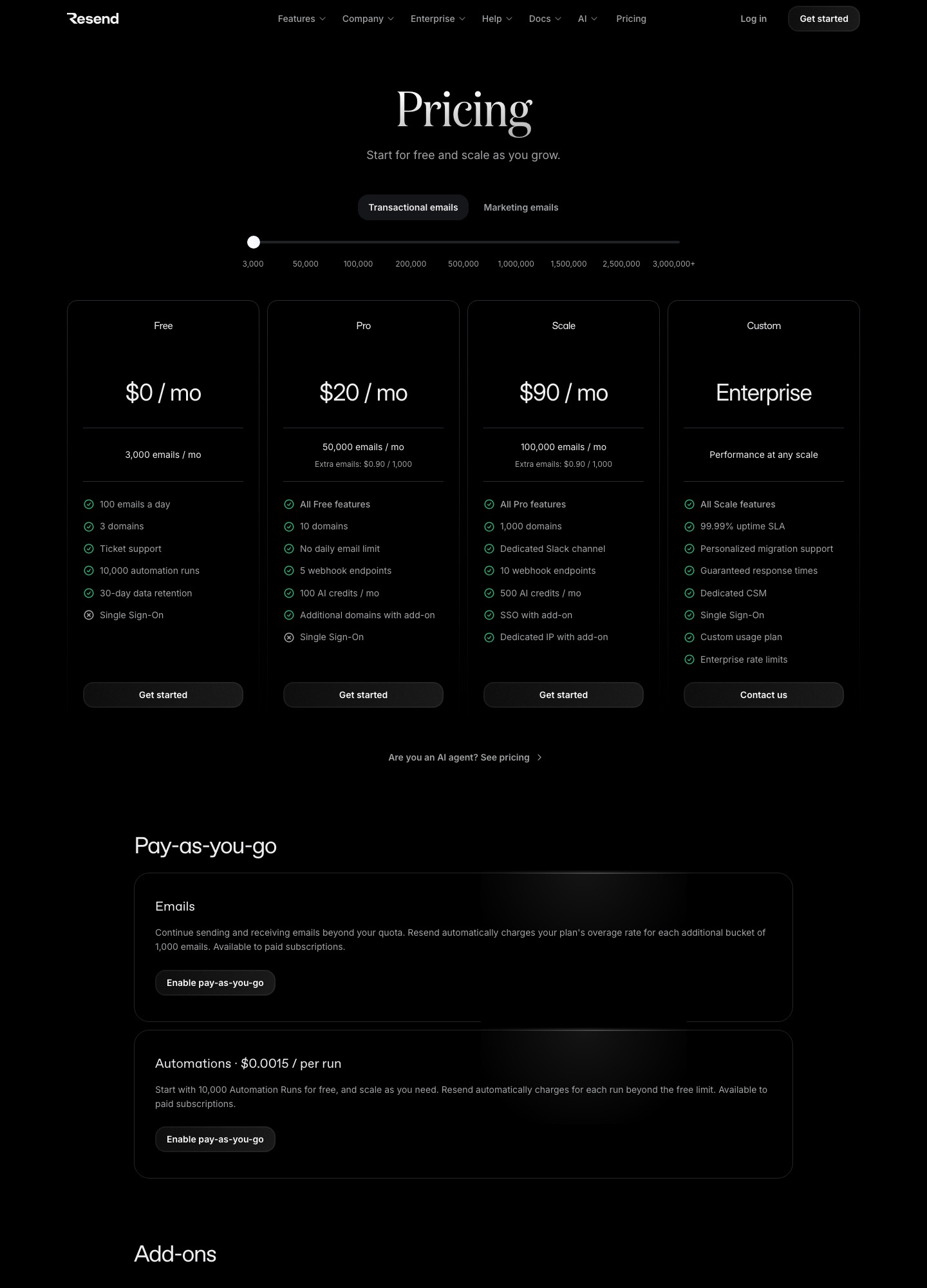
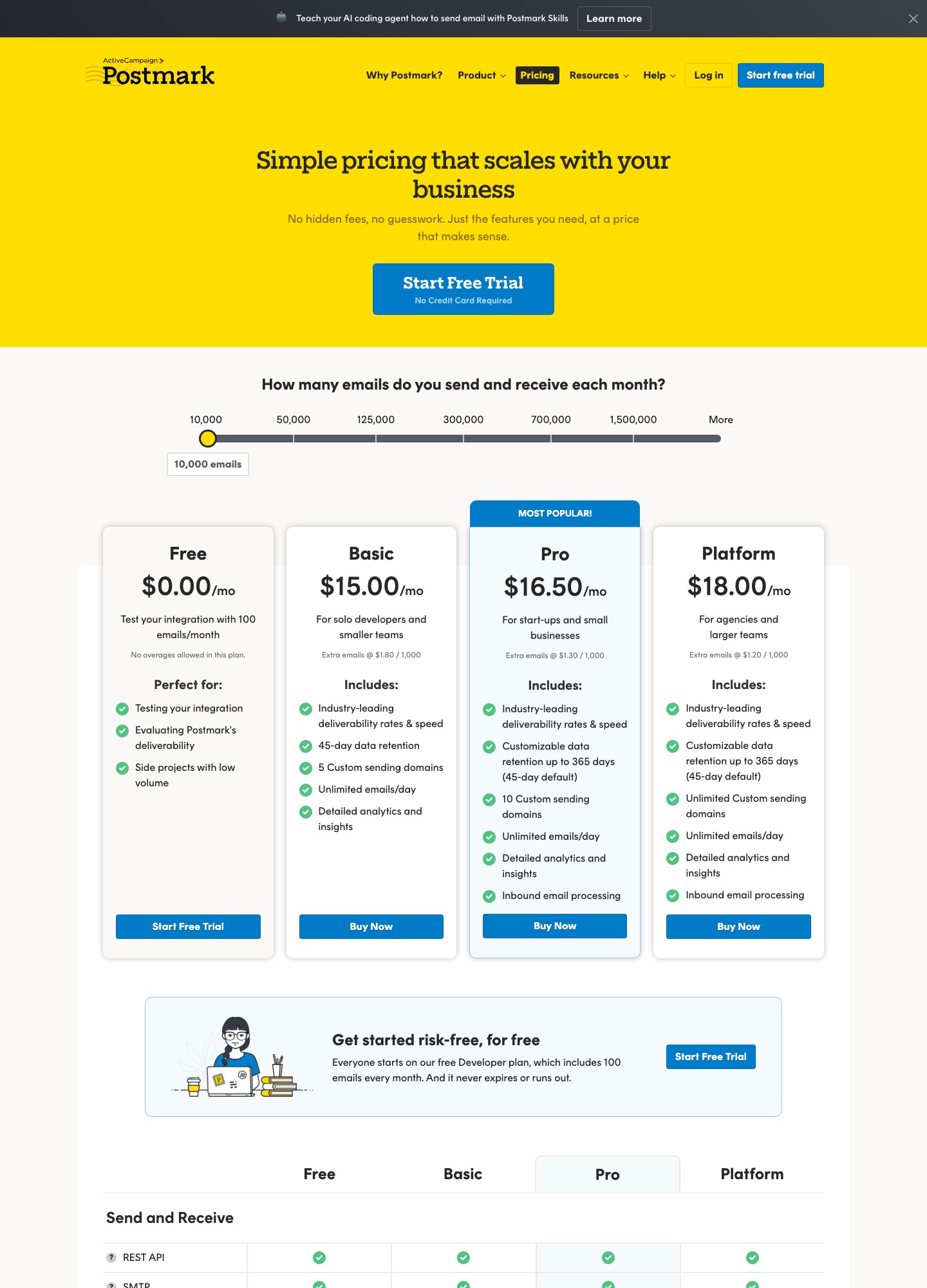
Both pages use a volume slider, and the two sliders do not stop at the same numbers. Postmark's stops are 10,000, 50,000, 125,000, 300,000, 700,000 and 1,500,000. Resend's transactional slider stops at 3,000, 50,000, 100,000, 200,000, 500,000, 1,000,000, 1,500,000, 2,500,000 and 3,000,000+. The table below uses only readings taken at those stops, and where a volume falls between stops it says so rather than inventing a price.
| Monthly volume | Resend (transactional) | Postmark | Arithmetic |
|---|---|---|---|
| 10,000 emails | Pro $20 (includes 50,000) | Basic $15, Pro $16.50, Platform $18 | $20 − $15 = $5 more at Resend than Basic; $20 − $18 = $2 more than Platform |
| 50,000 emails | Pro $20 | Basic $55, Pro $60.50, Platform $66 | $55 − $20 = $35 less at Resend than Basic; $66 − $20 = $46 less than Platform; 12 × $35 = $420 a year |
| 100,000 emails | Pro $35, or Scale $90 | No 100,000 stop; the next stop is 125,000: Basic $115, Pro $126.50, Platform $138 | Scale over Pro at Resend: $90 − $35 = $55 for the extra plan features; Postmark's 125,000 stop covers 25,000 more emails than Resend's 100,000 |
| 200,000 and above | Scale $160 at 200,000; $350 at 500,000 | Platform $294 at 300,000 (Basic $245, Pro $269.50) | Resend has no 300,000 stop and Postmark has no 200,000 or 500,000 stop, so no like-for-like figure exists on the pages |
Two things stand out. First, the cheapest point on Postmark's page, $15 for 10,000, beats Resend, but the Resend plan at $20 already includes five times that volume, so a team that grows from 10,000 emails to 40,000 stays at $20 on Resend. Postmark's page shows $15 at 10,000 and $55 at 50,000 on Basic and nothing in between, so the cost of 40,000 there has to be checked in the slider itself. Second, Resend's Pro-to-Scale step is about features, not volume: at 100,000 emails Scale costs $90 against Pro's $35, and what the extra $55 buys, per the pricing page, is 1,000 domains instead of 10, 10 webhook endpoints instead of 5, a dedicated Slack channel and the option of a dedicated IP and SSO as add-ons. Postmark's three plans work the other way round: the same volume costs $115, $126.50 or $138 at 125,000, and the difference between the plans is in domains, retention, inbound and users.
Postmark's slider question reads "How many emails do you send and receive each month?", so if you use inbound processing, count received mail in your volume and confirm how it is metered before you size a plan. Resend's marketing side is priced by contacts instead: its Marketing tab reads $0 at 1,000 contacts, $40 a month at 5,000 contacts and $80 at 10,000. The two tabs price separately on the page, so ask how they combine on one invoice if you plan to run both.
The free plans are not close to each other
Resend's free plan is a working plan: 3,000 emails a month, capped at 100 a day, with 3 domains, ticket support, 10,000 automation runs and 30-day data retention. The daily cap is the thing to plan around, because a welcome email to 150 sign-ups in one afternoon will not all go out until the next day. Pro removes the daily limit, per its pricing page.
Postmark's free plan is a trial that never expires: its page says "Everyone starts on our free Developer plan, which includes 100 emails every month. And it never expires or runs out," lists no overages, and describes itself as for testing your integration, evaluating Postmark's deliverability and low-volume side projects. A hundred emails is enough to wire up password resets and judge the dashboard, not to run a product. Anyone who needs real free capacity should read the two plans as a different category of offer.
Webhooks, logs and what you can see afterwards
Both services push delivery events to your server, and they differ in how you prove a request is genuine. Resend signs each webhook with a secret unique to the endpoint and sends Svix-style headers (svix-id, svix-timestamp and svix-signature). Its verification guide offers a resend.webhooks.verify call in its SDK, or the svix library, and warns that you must verify against the raw request body, because a framework that parses and re-stringifies the JSON will break the check. Its retries and replays page lists backoff waits of immediate, 5 seconds, 5 minutes, 30 minutes, 2 hours, 5 hours, 10 hours and a further 10 hours, turns an endpoint off and emails your team when it keeps failing, and lets you replay failed or succeeded messages by hand.
Postmark's webhooks overview covers delivery, bounce, spam complaint, open, click and subscription-change events plus inbound, and secures an endpoint with HTTP Basic credentials in the URL or an allowlist of Postmark's published IP ranges. It states plainly that Postmark does not currently support HMAC webhook signature verification and notes that the origin IP can change between attempts. Failed hooks are retried six times at 1, 5, 10, 10, 10 and 15 minutes, and it recommends storing the MessageID or the X-PM-Webhook-Trace-Id header to deduplicate retries. If your security review wants signed payloads, that single difference may decide the matter.
On retention, Resend's table shows 30 days on every plan except Enterprise, while Postmark's cards show 45 days by default on Basic, Pro and Platform, with Pro and Platform able to customise up to 365 days and a custom activity retention add-on starting at $5 a month. If your support team looks up what was sent to a customer six weeks ago, that gap is practical, not cosmetic.
Templates, sending API and SMTP
Postmark templates are server-side. Per its templates API reference, you send to the withTemplate endpoint with a TemplateId or TemplateAlias and a TemplateModel, a JSON object that can be nested, which generates the HTML body, text body and subject. Tags are Mustache-style, with variables, sections and each loops. Layouts are a separate template type with a required content placeholder, a standard template can reference one by alias, and a server may hold up to 100 templates. Batch sends of templates accept up to 500 messages per call, and the reference warns that the call returns a success status even when individual messages fail, so each result's ErrorCode has to be checked.
Resend's templates documentation says a template can be built in the no-code editor, from React Email files, from existing HTML, or through the API and CLI, and that only a published template can be sent. You pass a template object with an id and variables in place of an html body, as in this example from that page:
await resend.emails.send({
  from: 'Acme <onboarding@resend.dev>',
  to: 'delivered@resend.dev',
  template: {
    id: 'order-confirmation',
    variables: { PRODUCT: 'Vintage Macintosh', PRICE: 499 },
  },
});
If your front end is React and you already write emails as components, Resend's React Email path means templates can live in your repository and go through code review. If a marketer or support lead edits copy, Postmark's server-side templates, with layouts and a model you can validate, keep that work out of deploys. Neither is better in the abstract; it depends on who changes the words.
On the plain API, Postmark's send documentation uses an X-Postmark-Server-Token header, a single-message endpoint at /email, a batch endpoint that takes up to 500 messages and 50 MB per call, and a cap of 50 recipients across To, Cc and Bcc. Sending from an address without a confirmed sender signature returns a 422. Resend's send-email reference posts to /emails with a bearer token, supports an Idempotency-Key header (unique per request, kept for 24 hours), a scheduled_at field for delayed sending and name and value tags, and also caps recipients at 50. For SMTP, Postmark uses smtp.postmarkapp.com on ports 25, 2525 or 587 with the server token as both username and password, and Resend uses smtp.resend.com with the username "resend" and an API key as the password. Both are drop-in values for most frameworks' mailer settings.
Receiving email
Both can take inbound mail and hand it to your application, with a different division of labour. Postmark's inbound guide describes sending mail to an address at inbound.postmarkapp.com, where Postmark processes it and delivers the result to your webhook as JSON. On the pricing page the capability appears on Pro and Platform, not on Basic's card.
Resend's receiving documentation gives each account a managed receiving address, or you add an MX record to a custom domain and receive mail for any address there. Your webhook gets a notification, and you fetch the full content separately through an API call; attachments come as metadata with temporary download URLs. Received mail can be forwarded or replied to in the same thread. If you only need to parse replies to support or comment emails, either works; if the inbound feed must carry the complete message in the first payload with no second request, Postmark's description fits that more directly.
Deliverability: what the vendors say
Postmark's pricing page lists "Industry-leading deliverability rates & speed" on every paid plan and "Industry-leading delivery speeds. Up to 4x faster than other providers" among its highlights, and says it shares its delivery statistics to the major inbox providers on its status page. Postmark also lists DMARC monitoring as an add-on from $14 a month per domain. Resend's pricing table lists pristine shared IPs, automatic suppression lists, bounce details, deliverability insights and DKIM, SPF and DMARC authentication, and offers dedicated IP warming on Scale and Enterprise. These are the vendors' own descriptions. No inbox-placement test was run for this page, and neither vendor's wording is a measured result, so run a seed test or a small production pilot on your own domain before you move critical mail. The email deliverability guide covers the checks that matter more than the vendor you choose.
Moving from Postmark to Resend
- List what you use before you touch DNS. Write down your streams (which mail goes through "outbound" and which through "broadcasts"), every template alias, each webhook consumer, any inbound address and MX record, and any SMTP clients. Anything on that list needs a Resend equivalent.
- Verify a new subdomain in Resend. Follow the add-a-domain guide linked from Resend's domains page. Using a subdomain different from the one Postmark sends on keeps the two senders apart during the overlap. Check the Free plan's 3 domains or Pro's 10 against your list.
- Rebuild the templates. Each Postmark template becomes a Resend template, through the editor, an HTML import or React Email. Publish it, because Resend only sends published templates, and map the Postmark TemplateModel keys to Resend variable names. Postmark layouts have no one-to-one counterpart in what the Resend page describes, so expect to repeat the shared header and footer in each template or in React Email components.
- Change the sender. For SMTP clients, replace the host with smtp.resend.com, the username with "resend" and the password with an API key. For API code, switch the endpoint to /emails, the auth to a bearer token, field names from PascalCase (From, To, TemplateModel) to Resend's lowercase (from, to, template), and add an Idempotency-Key where a retry could double-send.
- Rewrite webhook handling. Postmark's Basic auth or IP allowlist becomes signature verification on the raw body, using the svix headers. Deduplicate on whatever id Resend's event payload carries rather than reusing Postmark's MessageID logic, and map each event name you handle.
- Move inbound last. Receiving is a different shape: a notification first, then a fetch for the content. Point the MX record only after the new handler works against test mail.
- Carry over suppressions and run both for a while. Neither vendor's pages read here describe a bulk suppression import, so check each dashboard and API for one, and move hard bounces and complaints over before the first live send. Route one mail type at a time, and export anything you need from Postmark's 45-day activity history before you cancel.
Moving from Resend to Postmark
- Pick the plan from the features, not the price. If you need inbound, you need Pro or Platform. If you send from many domains, Basic allows 5, Pro 10 and Platform unlimited. Compare that with how many domains you verified in Resend.
- Create a server and confirm senders. Postmark sends only from confirmed addresses, and its sender signatures guide recommends verifying the whole domain, with DKIM and Return-Path authentication, because authenticating is the fastest route to deliverability. The address must be on a domain you control, not Gmail or Yahoo.
- Sort mail into streams. Password resets and receipts go to the default transactional stream; anything with an unsubscribe link goes to a broadcast stream, which requires unsubscribe management. Set the stream explicitly in code so a mistake cannot send a newsletter down the transactional route.
- Convert templates. Resend variables become fields in a TemplateModel, and the HTML moves into Postmark templates. If you render React Email to HTML, you can send the HTML body directly while you decide whether to keep components or move to hosted templates.
- Swap the sender settings. SMTP becomes smtp.postmarkapp.com with the server token as username and password, and an X-PM-Message-Stream header if you want a stream other than the default. For API code, use the X-Postmark-Server-Token header and the /email or /email/batch endpoints. The Postmark send docs read for this page do not mention an idempotency header, so build your own dedupe before enabling retries.
- Plan for what has no counterpart. Resend's Marketing contacts, topics and automations have no equivalent in the Postmark pages read here, so a separate tool or a code-based replacement is needed for those flows. Webhooks lose signature verification, so add Basic auth over HTTPS and an IP allowlist, and verify the payload shape in your handler.
Choose Resend if, choose Postmark if
Choose Resend if
- You send somewhere between 10,000 and 100,000 emails a month and price matters: $20 for 50,000, or $35 for 100,000 on Pro.
- Your emails are React components, or you want templates to live in the repository.
- You want a free tier you can really use: 3,000 emails a month with a 100-a-day cap.
- You want welcome sequences, broadcasts and transactional mail under one vendor, with the Marketing tab free at 1,000 contacts.
- You need signed webhooks, with a replay button for missed events.
Choose Postmark if
- You send fewer than about 10,000 emails a month on a paid plan, where Basic at $15 undercuts Resend's $20.
- You want transactional, broadcast and inbound traffic to be separate named streams that you route per message.
- Your support team needs 45 days of activity history by default, or up to 365 days on Pro or Platform.
- Inbound email arrives as a single JSON webhook payload that your app handles in one step, and you are on Pro or Platform.
- Non-developers edit email copy, and you want hosted templates with shared layouts and a validated template model, so changes do not need a deploy.
If neither fits, Postmark vs SendGrid and Loops vs Resend cover two of the likeliest alternatives, email tools for transactional sending lists more options, and email tools for React developers covers the component-first case in detail.
Frequently asked questions
Is Resend cheaper than Postmark?
At the volumes both vendors publish, yes, and the gap widens as you grow. Resend Pro is $20 a month and includes 50,000 emails, while Postmark Basic is $55 at 50,000 (Pro $60.50, Platform $66). Below that, at 10,000 emails, Postmark Basic at $15 is $5 cheaper than Resend's $20 Pro plan. The plans are not identical, so compare domains, inbound and webhook limits as well as the monthly number.
Which one has the better free plan?
Resend's free plan is bigger: 3,000 emails a month with a limit of 100 a day and 3 domains. Postmark's free Developer plan is 100 emails a month with no overages allowed, which its pricing page positions for testing an integration and judging deliverability. If you need to send a few hundred real emails a month at no cost, only Resend's plan covers it, as long as you stay under the daily cap.
Can I use Resend and Postmark together?
Yes, and some teams do so by sending different mail types through each, on separate domains or subdomains so that the two sending reputations stay apart. The price of that choice is two dashboards, two webhook handlers and two suppression lists to keep in step. It makes most sense when you have a reason to split, such as keeping receipts and password resets on Postmark while product notifications or newsletters go through Resend.
Do Resend and Postmark both handle marketing email?
Resend now has a separate Marketing tab with broadcasts, segments, topics and automations, with a free tier at 1,000 contacts. Postmark describes broadcast message streams and a bulk email API, and its broadcast streams require unsubscribe management, but the pages read for this comparison do not describe contact audiences or event-triggered automations. If you want sequences built inside the same vendor as your transactional mail, Resend is the one to check first.