Kit (ConvertKit) Alternatives for Email Sequences
Leave Kit if you are paying Creator prices mainly to run sequences for a list under 10,000 and want the same sequences for less: MailerLite is the default, listing Comfort at $49 for 5,000 subscribers against Kit's pricing page reading $75 for Creator. Leave for Flodesk if you want unlimited workflows at a lower price once you pass 10,000. Stay if you sell products through Kit's own checkout, run Visual Automations that branch on purchases, or sit near 25,000 subscribers, where Creator's $166 undercuts MailerLite Comfort's $179.
This guide is written for a creator, coach, course seller or small publisher who runs welcome, nurture and launch sequences on Kit, which most people still call ConvertKit, and is wondering whether to move. Prices and limits were read from the vendors' own pricing pages and help articles on 7 October 2026 and are linked where used. The editor reads pages and documentation and does not run the tools, so descriptions of how a feature behaves are the vendor's, quoted or closely paraphrased.
What Kit's pricing page shows, and what the same list costs elsewhere
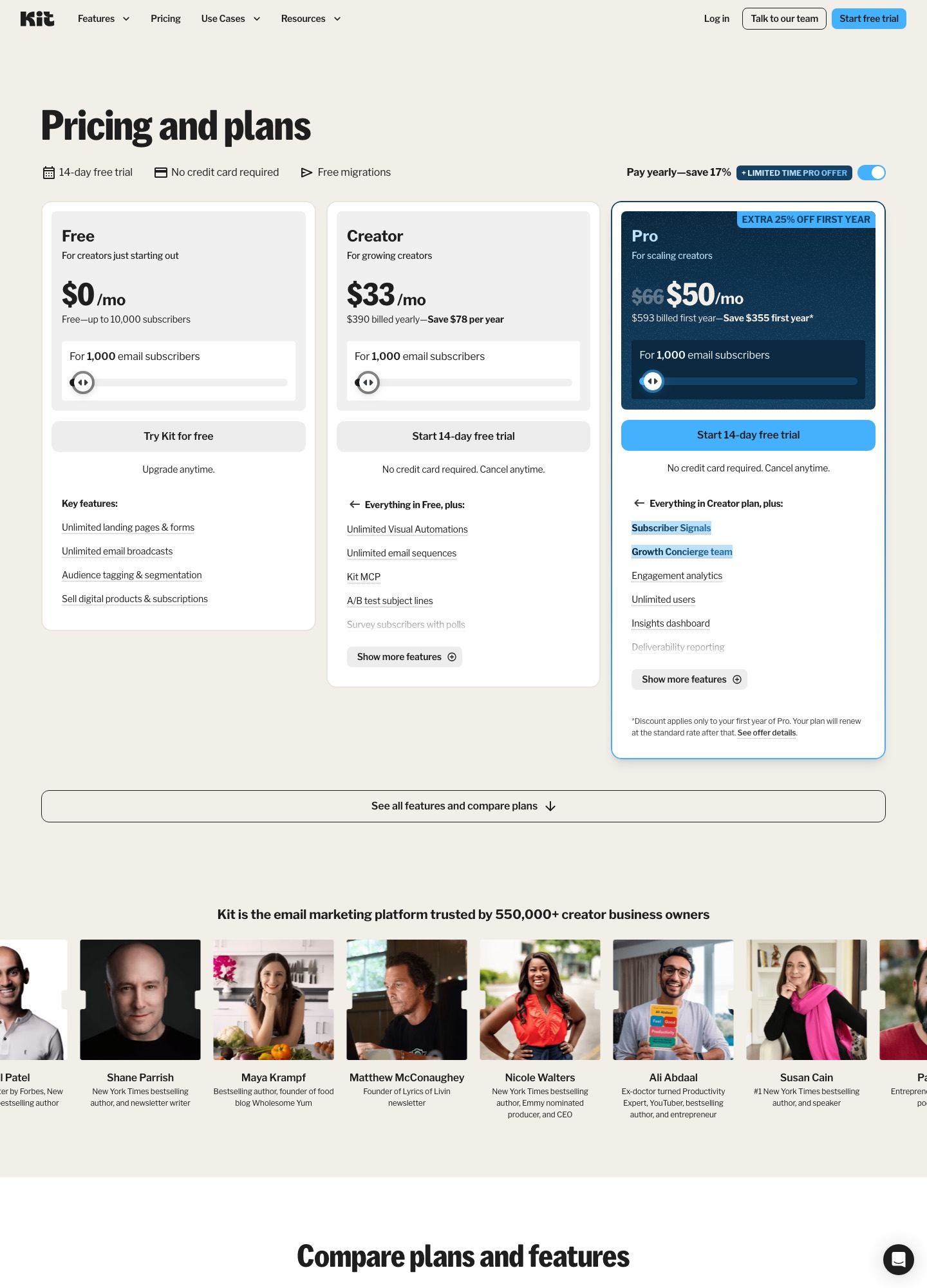
Kit has three plans. Free holds up to 10,000 subscribers; Creator adds unlimited Visual Automations and unlimited email sequences; Pro adds the reporting, team and growth tools covered further down. The $33 for Creator is the yearly-billed rate at 1,000 subscribers: the page shows $390 billed yearly and a $78 yearly saving, but it states no monthly-billing price, so the yearly rate is the only Creator figure used on this page. The slider's other stops read $75 at 5,000 subscribers, $116 at 10,000 and $166 at 25,000 for Creator, and $158 and $233 at 10,000 and 25,000 for Pro.
| Plan (billing basis) | 1,000 subscribers | 5,000 | 10,000 | 25,000 |
|---|---|---|---|---|
| Kit Creator (yearly toggle) | $33 | $75 | $116 | $166 |
| Kit Pro (yearly toggle) | $66 ($50 first year) | not read | $158 | $233 |
| MailerLite Comfort (monthly) | $19 | $49 | $89 | $179 |
| MailerLite Power (monthly) | $39 | $69 | $129 | $239 |
| Flodesk Pro (monthly) | $28 | $59 | $79 | $169 |
| Flodesk Pro (annual) | $25 | $54 | $72 | $155 |
| ActiveCampaign Plus (annual) | $49 | $145 | $189 | $389 |
| beehiiv Lite (yearly) | not read | $95 | $119 | not read |
| Drip (monthly) | $39 at 2,500 | $89 | $154 | $369 |
The assumptions: every row is a plan that lists multi-step automation, the Kit and ActiveCampaign rows are the vendors' yearly or annual rates, MailerLite is monthly, and subscribers, contacts and people are counted alike. Comparing yearly Kit with monthly MailerLite flatters MailerLite by the amount a yearly discount would take off it, so use the Flodesk annual row for a like-for-like reading.
The arithmetic, a month at a time. At 5,000 subscribers Kit Creator's $75 is $26 above MailerLite Comfort's $49 ($312 a year) and $21 above Flodesk Pro on annual billing ($54, or $252 a year). At 10,000 the gaps are $27 over Comfort ($116 minus $89, $324 a year) and $44 over Flodesk annual ($116 minus $72, $528 a year). At 25,000 Kit turns cheaper: $166 is $13 under Comfort ($156 a year) and $11 under Flodesk annual ($132 a year). For a small business that is not selling inside Kit, the cheapest honest saving sits between 3,000 and 15,000 subscribers.
Four things Kit's plan table holds back or charges extra for
- Sequences themselves are not free. The compare table shows the visual automation builder, the template library and automated email sequences from Creator. Free's 10,000 subscribers are broadcast-only, which suits a big cold list you are warming slowly but not a welcome series.
- The cheapest Pro number is a first-year number. The card shows $66 struck through to $50, $593 billed in year one, and says the discount "applies only to your first year of Pro" with renewal at the standard rate. Anyone comparing on the $50 figure is comparing against a price they will pay once.
- Reporting and teamwork sit on Pro. The compare table lists deliverability reporting, advanced A/B testing (up to five subject lines or content tests, against two subject lines on Free and Creator), collaborative editing, editing links in sent broadcasts, the insights dashboard and unlimited users on Pro only. Users are 1 on Free and 2 on Creator. A two-person team that wants to see which mailbox providers are underperforming pays the Pro step, $116 to $158 at 10,000 subscribers.
- Selling inside Kit has a fee. The compare table lists a transaction fee of 3.5% plus 30 cents on all three plans for digital products and subscriptions, described as inclusive of card processing, with Kit keeping 0.6%. On a $100 sale that is $3.80. beehiiv's pricing page lists a 0% take on paid subscription and digital product revenue plus Stripe's standard 2.9% plus $0.30, which is $3.20 on the same sale. The $0.60 difference is not a reason to move alone: beehiiv Lite on yearly billing at 5,000 subscribers is $20 a month above Kit Creator, so the fee saving only covers that gap at $3,333 of monthly sales ($20 divided by 0.006).
Seven places to take a Kit list, ranked by who is most likely to be leaving
1. MailerLite: the same sequences for less, up to about 10,000 subscribers
MailerLite is the first call for the Kit user who runs sequences and sells little. Its automation page lists up to 3 active automations of 5 steps on Free, 50 active automations and 100 steps on Comfort, and unlimited automations with 100 steps each on Power, and its pricing page lists unlimited automation templates and multiple triggers on Power. You gain a lower bill at 5,000 and 10,000 subscribers and a free plan that does include automation; you lose Kit's free tier of 10,000 subscribers, since MailerLite Free stops at 250 and locks sending beyond it. MailerLite also sells digital products, with 1 on Free, 5 on Comfort and unlimited on Power. See email sequence tools for creator lead nurturing for how the two handle tag-by-click nurture.
Price: MailerLite's pricing page reads Comfort at $19 a month at 1,000 subscribers, $49 at 5,000, $89 at 10,000 and $179 at 25,000; Power at $39, $69, $129 and $239.
2. Flodesk: unlimited workflows and a lower top end
Flodesk's pricing page prices by active subscriber, lists unlimited email sends on its paid plans, and splits plans by workflows: Lite lists 1 workflow, Pro unlimited workflows and integrated checkout. Pro is therefore the like-for-like comparison with Creator. You gain a lower yearly price at every size in the table above and a design-led editor; you lose Kit's 10,000-subscriber free plan and any Kit-specific features you use, such as its recommendations network and sponsorship matching, both listed in Kit's compare table.
Price: Pro is $28 a month at 1,000 subscribers on monthly billing, $59 at 5,000, $79 at 10,000 and $169 at 25,000; annual rates are $25, $54, $72 and $155. Lite is cheaper but carries one workflow.
3. beehiiv: for a newsletter whose revenue is subscriptions
beehiiv's pricing page offers a free plan for up to 2,500 subscribers with unlimited sends and puts automations, paid subscriptions and audience polls on Lite. The fee arithmetic above is the case for it; the case against is the slider. You gain a publication-first product; you lose price, as Lite is $95 a month on yearly billing at 5,000 subscribers against Kit Creator's $75.
Price: Lite at 5,000 subscribers is $109 monthly or $95 yearly; at 10,000, $139 monthly or $119 yearly.
4. Systeme.io: when the funnel and the course matter more than the emails
Systeme.io's pricing page lists unlimited emailing on every plan, 0% transaction fees and a free plan for up to 2,000 contacts. The trade is capacity: Startup lists 5 workflows and 10 automation rules, against Kit Creator's unlimited Visual Automations. You gain funnels, courses and payments in one account at a very low price; you lose headroom, and you should count the sequences you run before moving.
Price: Startup is $17 a month for up to 5,000 contacts, $58 under Kit Creator's $75 at the same size ($696 a year); Webinar is $47 for 10,000 contacts and Unlimited $97.
5. ActiveCampaign: when the list has become a sales pipeline
A Kit user whose launches now end in calls and proposals can use ActiveCampaign for a standard CRM beside the automation builder. Its pricing page lists Starter with 5 actions per automation and 1 user, and Plus above it, with no free plan. You gain contact records that sit next to your email logic and segmentation that deepens on Pro; you lose simplicity and pay more at every size in the table. Alternatives to ActiveCampaign covers the way back.
Price: on annual billing Plus is $49 at 1,000 contacts, $145 at 5,000, $189 at 10,000 and $389 at 25,000; Starter is $15, $79, $149 and $391.
6. Drip: for a creator who is turning into a shop
Drip's pricing page prices by active people and email volume, lists unlimited sends and up to 50 workflows on the tiers read, and offers a 14-day trial with no card instead of a free plan. You gain store-centred segmentation; you lose price, as Drip costs more than Kit Creator at every size in the table ($154 against $116 at 10,000). The direct comparison is on ConvertKit vs Drip.
Price: $39 a month for up to 2,500 people, $89 at 5,000, $154 at 10,000 and $369 at 25,000.
7. Brevo: for a large, mostly dormant list
Brevo's plans article says the free plan includes 300 daily email sends and storage for up to 100,000 contacts, with marketing automation available for up to 2,000 contacts on Free, and unlimited contacts on Standard. Because Brevo prices by monthly email volume rather than list size, a big list that you email rarely costs little. You gain that; you lose a creator toolkit, with no equivalent of Kit's recommendations network.
Price: Brevo's pricing page and plans article give Starter from $9 a month and Standard from $18, both at 5,000 emails a month.
A three-week exit from Kit
Kit's export article is short. Go to Subscribers, use the Status button to pick a status, tick the top checkbox and then Select all, open the three-dot menu and choose Export. The file is emailed to the account address, can take several minutes, and its link expires after five days. The CSV carries first name, email, created date, status, tags, location, attribution data and custom fields. The article only walks through the Confirmed filter, so before you close anything, open the Status button yourself and see which other groups your account holds (unsubscribed, bounced, complained), then export each; the status column is what lets you tell them apart later.
Three things need care. Tags are your segmentation, and they arrive in a single column, so decide how each becomes a tag, list or group in the destination before importing. Sequences are not in the export: Kit's automations page describes sequences running inside branched workflows, so for every automation write down the trigger (form, tag, purchase), each branch and the content of each email. And commerce is a separate move: if products sell through Kit's checkout, that is its own migration. Kit's Free plan lists unlimited landing pages and forms and selling digital products, so for a list under 10,000 it may be worth checking whether downgrading rather than cancelling keeps those pages alive while the sequences run elsewhere. The trade is two systems holding subscriber data.
- Days 1 to 2. Run the exports, one per status, and screenshot each automation and each sequence email. Check whether you are on yearly billing: the pricing page's "$390 billed yearly" means you have paid up front, so the best exit date is a renewal date.
- Days 3 to 5. Set up the destination, authenticate the domain, import only confirmed subscribers with tags mapped, and load the unsubscribed and complained files as suppressions. If the destination is MailerLite, its import article says every subscriber you add must have given consent, and that addresses already unsubscribed or labelled bounced, unconfirmed or spam complaint may fail to import, which is the behaviour you want. If it is Brevo, import the same files with the blocklist option from its blocklist article.
- Days 6 to 12. Rebuild the welcome sequence first, then the lead-magnet nurture, then launches. Test with three seed addresses, one of which unsubscribes midway.
- Day 13. Move your forms and landing pages to the new tool. Leave Kit's sequences running for people already inside. A 14-day nurture starting on day 13 clears at about day 27.
- Day 28. Export Kit's unsubscribed and complained groups again and add any new rows to the suppression list. This catches people who opted out during the overlap.
- Day 29 onward. Downgrade or cancel at renewal. For the general version of this process, see the email sequence tools migration guide.
Situations where Kit is still the better tool
A writer with 10,000 subscribers sells a $49 course and a $9 monthly membership through Kit's checkout, tags buyers automatically and runs eight Visual Automations that branch on purchase. Kit Creator at $116 costs $44 a month more than Flodesk Pro on annual billing, $528 a year, and a move would mean rebuilding eight automations and re-pointing checkout. That is not a good trade unless something else is wrong. Equally, if your list is near 25,000, Kit's $166 beats MailerLite Comfort ($179), Flodesk Pro monthly ($169), and every other row in the table except Flodesk's annual $155, so the price case for leaving disappears. If none of that applies, browse email sequence tool alternatives, or the solopreneur guide if you run the list alone.
Frequently asked questions
Does Kit's free plan include sequences?
No. Kit's pricing page lists the Free plan as up to 10,000 subscribers with unlimited landing pages, forms and broadcasts, tagging, segmentation and the ability to sell digital products, but its feature table shows the Visual Automation builder and automated email sequences from Creator upward. A welcome series on the free plan means sending each email by hand as a broadcast.
Is the $50 Pro price permanent?
No. Kit's pricing page shows Pro at $66 a month at 1,000 subscribers, struck through to $50 with a first-year offer ($593 billed in the first year), and a footnote that the discount applies only to the first year of Pro and the plan renews at the standard rate. If you are comparing Pro with another vendor, use $66, not $50, for anything beyond year one.
How do I export Kit subscribers along with their tags?
Per Kit's export article, go to Subscribers, choose a status filter, tick the top checkbox and click Select all, open the three-dot menu and choose Export; a download link arrives by email and expires after five days. The CSV includes first name, email, created date, status, tags, location, attribution data and custom fields. If the file looks short, the usual cause is that Select all was not clicked.
Will my Kit sequences and Visual Automations come with me?
The exports described in Kit's help centre carry subscriber data, not workflow logic, so plan to rebuild every automation in the new tool. Kit's automations page describes sequences as running inside branched workflows, so for each automation note its trigger (form, tag, purchase), its branches and the content of every email before you start. Tags travel in the CSV, which is what lets you recreate the entry rules.
Does Kit charge for unsubscribed people?
Kit's plan table says subscribers are only counted if they are unique and active, so unsubscribed addresses are not what you are paying for. Keep them anyway: the export and its status column are your suppression record, and the person who unsubscribed in Kit must not receive mail from the next tool.