Drip Alternatives for Email Sequences
Drip alternatives for email sequences: why stores leave, seven ranked options, costs at 5,000, 10,000 and 25,000 people, and how to export from Drip.
Leave Drip if the bill is the issue. Its slider reads $89 at 5,000 people, $154 at 10,000 and $369 at 25,000, so the price per person barely falls as you grow, and each invoice follows last month's peak. For most stores the default is MailerLite, whose Comfort plan reads $49 at 5,000 subscribers, $89 at 10,000 and $179 at 25,000, and which has a free plan Drip lacks. Pick Omnisend or Klaviyo if you want a store-first platform with SMS. Stay if revenue per email carries your decisions or you already use most of Drip's 50 workflows.
All prices were read from the vendors' own pages on 7 October 2026, in US dollars a month, and each is linked where it appears.
Drip's pricing page in one look
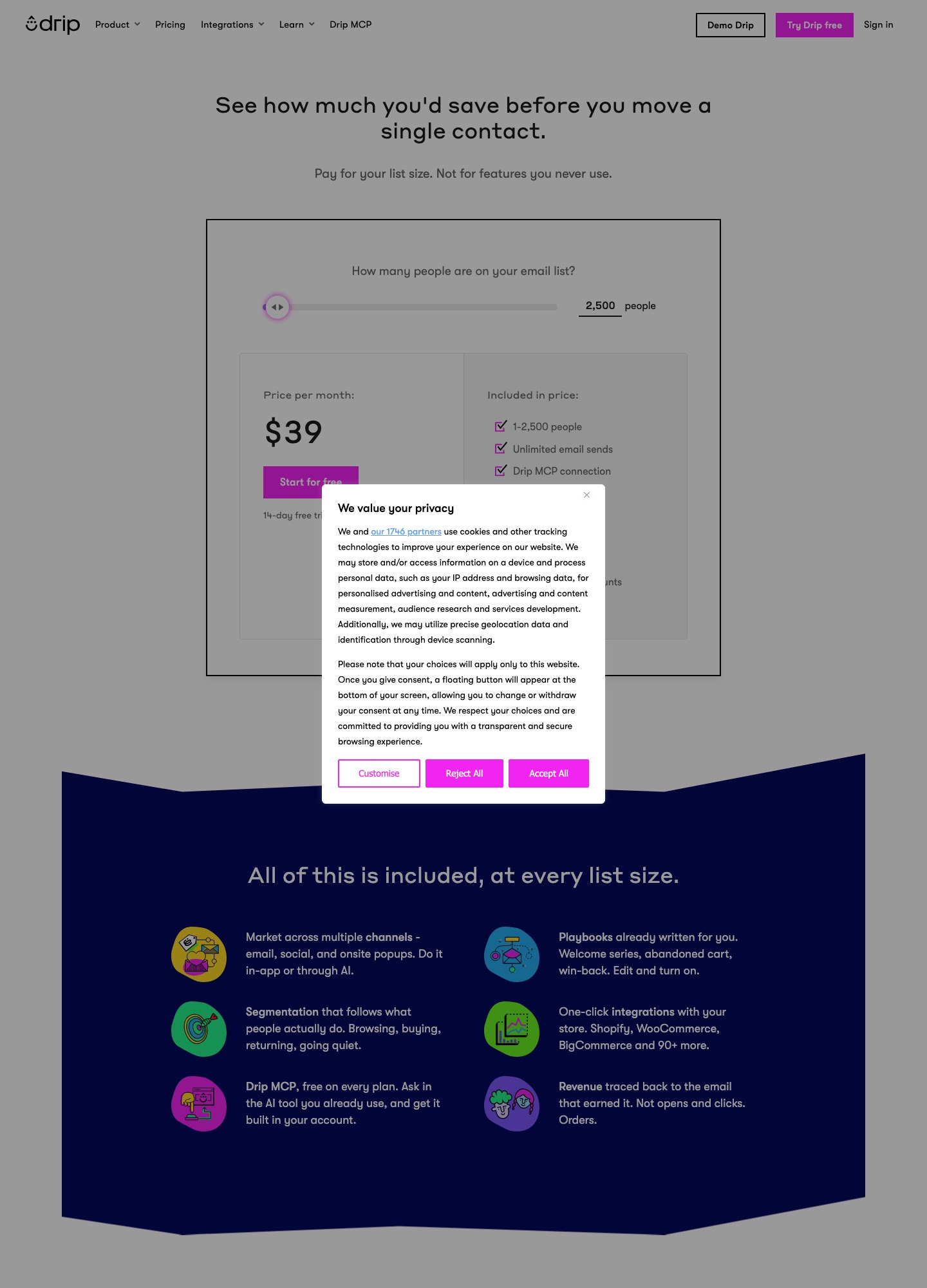
Drip's pricing page is one slider and one bundle. The price rises in bands of active people: $39 up to 2,500, $49 at 3,000, $89 at 5,000, $124 at 7,500, $154 at 10,000, $209 at 15,000, $289 at 20,000, $369 at 25,000, $449 at 30,000, $609 at 40,000 and $699 at 50,000. Every band lists unlimited email sends, dynamic segments, onsite campaigns and up to 50 workflows through 30,000 people. The 40,000 and 50,000 readings list 480,000 and 600,000 sends instead, which is 12 per person in both cases, and the 50,000 button changes to Book a demo. The page says the cost depends on active people and "the volume of emails you send during the month".
What pushes people to look elsewhere
The price per person is nearly flat
Divide each reading by its people count: 89 / 5,000 = $0.0178, 154 / 10,000 = $0.0154, 369 / 25,000 = $0.0148 and 699 / 50,000 = $0.0140. Doubling the list from 25,000 to 50,000 does not halve the unit price; it moves it by less than a tenth of a cent. Growth on Drip is therefore almost linear, which is why the gap with cheaper rivals widens in dollars as the list grows.
The bill follows last month's peak
Drip's article on how it calculates your bill describes a high watermark system. Each invoice covers the next month of service but is priced on the highest number of active people and email sends in the previous month. Deleting people or moving them to Inactive part-way through a cycle does not lower that cycle, and the downgrade lands in the following month. Its Inactive People article adds that someone you reactivate is billed again, and that with a store connected, a Placed an order event reactivates a customer you had parked. A win-back flow that works can therefore raise next month's bill.
There is no free plan
The slider's button reads "Start for free", but the free part is a 14-day trial with no credit card. The FAQ says unlimited emails are unavailable during it and that, if the trial lapses, the account becomes inactive and forms and campaigns pause. Compare that with Klaviyo or Mailchimp, which both list a free plan for 250 contacts, and MailerLite, whose free plan is 250 subscribers and 2,500 emails.
Workflow cap and chat support are tied to the plan
Its automation page says Drip limits each account to 50 workflows to protect performance, and that you should not need more than 50 active at once. That is comfortable against the 20-plus ecommerce templates it ships, but MailerLite's Comfort plan has the same 50 and Brevo's Standard lists unlimited, so the cap is a reason to move only if you build many variants. The FAQ gives email support on weekdays to every paying customer and live chat on weekdays only from $99 a month, so the $49 band at 3,000 people has no chat.
Above 30,000 people, sending volume starts to count
The billing article says High Volume plans have a monthly send limit and that going past it upgrades you to the next plan for that period. With 480,000 sends listed at 40,000 people, a store mailing each person 12 times a month sits right at the line: 40,000 x 12 = 480,000.
Who should not leave
Take a store with 5,000 people, 4 flows live and an owner who judges every email by revenue. Drip's page says revenue is traced to the email that earned it, in orders instead of opens and clicks. Moving to MailerLite Comfort at the same list size saves 89 - 49 = 40 a month, or 40 x 12 = 480 a year, and costs a rebuild plus a gap in order attribution while the new tool collects its own history. If you also run onsite campaigns and have 40 of your 50 workflows in use, the rebuild is bigger than the saving. In that case stay, prune the list before your next cycle so the peak stays low, and review again at the next price band.
The shortlist, with the best default first
The order is written for a store leaving Drip over its bill. If your reason is the 50-workflow cap, move Brevo and Klaviyo up. If your flows end with a salesperson, start from number four.
1. MailerLite: the default for most leavers
Price: MailerLite's pricing page reads Comfort $49 at 5,000 subscribers, $89 at 10,000 and $179 at 25,000, and Power $69, $129 and $239 at the same stops.
The monthly gap to Drip is 154 - 89 = 65 at 10,000 on Comfort, and 369 - 179 = 190 at 25,000, which is 190 x 12 = 2,280 a year. Comfort allows 50 active automations of up to 100 steps, the same count as Drip's workflow cap, and sends 10 times the tier ceiling. Power lists unlimited automations and emails. The free plan allows 250 subscribers, 2,500 emails and 3 active automations of 5 steps. MailerLite states that its data storage center is in the European Union and cites ISO 27001. What you give up is a store-first product: the grid's ecommerce rows have no readable per-plan marks in the text, so test cart, browse and post-purchase triggers on a trial, and do not expect order-level revenue attribution to be identical.
2. Omnisend: store-first, with a free tier
Price: Omnisend's pricing page shows Free at $0 for 250 contacts and 500 emails a month, and promotional first-three-month rates of $11.20 for Standard and $41.30 for Pro.
Its grid lists pre-built workflows for cart abandonment, welcome, post-purchase and re-engagement, so the template list resembles Drip's. Standard allows 12 times the list size in emails and unlimited sends need Pro, which is the trade against Drip's unlimited sends. Drip is not among the platforms with an automated migration tool on Omnisend's migration guide, which names Mailchimp, Klaviyo and Yotpo, so you arrive by CSV. Its free Kickstart service, for accounts over 250 contacts, covers up to 4 workflows and 5 forms rebuilt by hand.
3. Klaviyo: more depth, a higher bill at the top
Price: Klaviyo's pricing page reads $100 at 5,000 profiles, $150 at 10,000 and $400 at 25,000.
Klaviyo is cheaper than Drip only at 10,000, by 4. At 25,000 it costs 400 - 369 = 31 more. Choose it when your flows need its profile and event data, or when SMS belongs in the same tool, not to save money. Sends are capped at 10 times the profile limit, whereas Drip's readouts to 30,000 people say unlimited. Klaviyo counts every profile it can email, including people who never subscribed, so import only people you may email. Its import article uses a consent column and a 50 MB file limit, and asks you to switch off flows triggered by the list you are uploading. More in Klaviyo alternatives.
4. ActiveCampaign: when the sequence ends with a person
Price: ActiveCampaign's pricing page reads Starter $79 at 5,000 contacts and $149 at 10,000, and Plus $145 and $189, billed annually.
It beats Drip on price at 10,000 only on Starter, by 154 - 149 = 5, and Starter caps each automation at 5 actions. Plus is 189 - 154 = 35 above Drip there. Pick it for deal pipelines and lead scoring, which the page sells as add-ons without prices. The full comparison is in ActiveCampaign versus Drip.
5. Brevo: volume pricing and unlimited workflows
Price: Brevo's pricing page starts Starter at $9 and Standard at $18 a month for 5,000 emails a month on monthly billing.
It is the answer if the 50-workflow cap is your pain, because Standard lists unlimited multi-step workflows and web and event tracking. The price tracks email volume, so a large list that is mailed lightly stays inexpensive. Its ecommerce extras, AI recommendations, back-in-stock alerts and coupons, appear in the Professional card from $499, and SMS credit is sold separately.
6. Kit: for stores that sell digital products
Price: Kit's pricing page reads Creator $33 at 1,000 subscribers on yearly billing ($390 a year), and its slider reads $75 at 5,000 subscribers, $116 at 10,000 and $166 at 25,000.
Kit's free plan covers up to 10,000 subscribers but excludes visual automations and sequences, which start on Creator, where both are unlimited. It lists free migrations in which a team rebuilds forms, templates and automations. The product is aimed at creators, with digital-product sales built in, so it suits a shop selling courses or downloads and not a physical-goods store with cart and browse triggers. The comparison is in Kit versus Drip.
7. Mailchimp: familiar, no relief on sends
Price: Mailchimp's pricing page lists Standard at $100 for 2,501 to 5,000 contacts and $135 for 5,001 to 10,000.
Those bands sit 11 above Drip at 5,000 (100 - 89) and 19 below it at 10,000 (154 - 135). Standard sends 12 times the contacts. The page shows 50 percent first-year offers on some bands, so the first twelve invoices will not match the list price. It takes seventh place because nothing read here shows store triggers equal to Drip's.
If your "store" is a subscription app, the better comparisons are Customer.io against Drip and Encharge against Drip, which look at events and billing triggers instead of orders.
Cost at 5,000, 10,000 and 25,000 people
Figures are monthly list prices. ActiveCampaign is billed annually, MailerLite is shown monthly, Mailchimp is the list price before offers, and Kit's $75, $116 and $166 are the page's slider readings. Klaviyo's page does not name a term beside its slider. A person, contact, profile and subscriber are treated as one email address.
| Tool and plan | 5,000 | 10,000 | 25,000 |
|---|---|---|---|
| Drip (all sends unlimited at these stops) | $89 | $154 | $369 |
| MailerLite Comfort | $49 | $89 | $179 |
| MailerLite Power | $69 | $129 | $239 |
| Kit Creator | $75 | $116 | $166 |
| Klaviyo Email | $100 | $150 | $400 |
| ActiveCampaign Starter | $79 | $149 | $391 |
| ActiveCampaign Plus | $145 | $189 | $389 |
| Mailchimp Standard | $100 | $135 | $310 (20,001 to 25,000 band) |
The yearly gap between Drip and each cheaper plan at 25,000 people is (369 - 179) x 12 = 2,280 for MailerLite Comfort, (369 - 239) x 12 = 1,560 for Power and (369 - 166) x 12 = 2,436 for Kit Creator. At 10,000 the same sums are 780 for Comfort (65 x 12) and 300 for Power (25 x 12). Brevo and Sendlane price by email volume, so they do not fit a people column. Brevo starts at $9 or $18 for 5,000 emails a month, and Omnisend's page showed only first-three-month rates, so neither is in the grid.
Leaving Drip: what to export, what stays, and the order to do it
Week one: take everything the exports allow
Drip's export article covers four separate pulls. All exports are CSV files except one, and the link arrives at the email address you are logged in with.
- People. Go to People, then Active, filter to a segment or leave it blank, and choose Actions, then Export to CSV. The file holds email, id, status (active or unsubscribed), created and confirmed timestamps, tags, email series campaign names, referrer, landing URL, IP address, lead score, lifetime value, user id and custom fields. Export one file per tag group you plan to rebuild as a segment.
- Inactive people. The Inactive tab has its own Actions, Export to CSV, which downloads straight to the browser with token, email, time zone, status, created and inactive dates and lifetime value. Inactive means you deactivated them, not that they opted out, so do not import this file anywhere that bills per contact unless you mean to market to them.
- Account export. Settings, Account, Export Account returns templates, the people list and email series campaigns. The article says emails built with the visual email builder and events are not exportable, and it does not name workflows, so record each workflow's trigger, waits and branches by hand.
- Analytics. The Analytics tab exports new people, unsubscribes, email metrics, clicks and events. A bulk email metrics download holds no email addresses.
Two traps sit in the data. Drip's import article says lifetime value is entered in cents, so check how the exported column reads before mapping it into a tool that expects dollars. And statuses in the people file are only active or unsubscribed, so look at your bounce handling in Drip before you trust the file as a suppression list.
Week two: load, rebuild, switch
Load unsubscribed people first at the destination, then the subscribed file with tags. For Klaviyo that means a consent column in the CSV and a switch-off of flows tied to the list; for Omnisend it means a CSV import, since Drip is not on its automated list, and the free Kickstart rebuild if you have more than 250 contacts. Kit's page lists free migrations as well. Authenticate the sending domain before the first send.
Rebuild in the order that matches how Drip names its templates: abandoned cart, abandoned browse, post-purchase, welcome series and win-back. Leave each Drip workflow running until its replacement has sent a real order through, then pause one and switch on the other the same day. Onsite campaigns have to be rebuilt as pop-ups or forms in the new tool, because no export of them is described.
On billing, Drip says you can cancel any time in Billing Settings, and the bill article says invoices price the previous month's peak. Ask support what your final invoice will cover before you fix a cancellation date. Keep the people export for as long as you hold consent records, and read the migration guide for the evidence you need to keep.
Frequently asked questions
Does Drip bill for inactive people?
Not on the current statement, but with a delay. Drip's help center says inactive people do not count toward your billing statement, yet anyone who was active during the cycle counts toward that cycle's total under its high watermark system. Reactivating someone bills them again, and if a store connection or the Shopper Activity API sends a Placed an order event, an inactive customer is reactivated automatically unless support sets up a rule to keep them inactive.
Is there a free Drip plan?
No. Drip's pricing page offers a 14-day free trial with no credit card, and its FAQ says unlimited emails are not available during the trial. If the trial ends without an upgrade, the account becomes inactive and active forms and campaigns are paused until you add payment details.
Can I export my Drip workflows?
The export article lists templates, the people list and email series campaigns in an account export, and says emails built in the visual email builder and events are not exportable. Workflows are not named, so write down each trigger, delay and branch before you cancel. Analytics reports for email metrics, clicks and unsubscribes can be exported as CSV files.
How does Drip compare with Klaviyo at 10,000 people?
Drip's slider reads $154 at 10,000 people and Klaviyo's reads $150 at 10,000 profiles, so Klaviyo is 4 lower there. Drip is 11 lower at 5,000 (89 against 100) and 31 lower at 25,000 (369 against 400). The real difference is sending: Drip lists unlimited sends at these stops, while Klaviyo caps sends at 10 times the profile limit.
Do I need an online store to use Drip, and what if I do not have one?
Drip's FAQ says a store is not required, but that the product is built specifically for ecommerce and gives the most to people who run one. If your sequences follow product events or subscriptions instead of orders, the Customer.io and Encharge comparisons on this site are a better starting point than another store-first tool.