Postmark Alternatives for Email Sequences
Postmark delivers application email well and, by its own pages, does not run sequences: its message-streams page says it lacks list uploads, a WYSIWYG editor and campaign-based reporting, and its guide for ActiveCampaign users says to use ActiveCampaign for automation and journeys. Leave when onboarding, trial or payment-failure series need a builder, or when the $55 price at 50,000 emails is the pain. The default is Resend: automations and sending in one account, $20 at that same 50,000. If you only miss the builder, keep Postmark delivering and add Customer.io, which Postmark lists as an integration. Stay if your code already schedules the series and you value separate streams and 45-day history.
The reader here sends receipts, resets and invites through Postmark and now wants onboarding, trial-expiry or dunning emails on a schedule. Figures come from Postmark's pricing page, its developer documentation and each alternative's own pages, read on 7 October 2026. The editors read documentation and run no sends of their own, so behaviour is described as documented.
What a sequence looks like when the sender has no builder
Postmark sorts mail into message streams, and its message-streams page defines the two main kinds in terms of intent. A transactional stream is for a single recipient, triggered by something a user does or does not do, with an opt-out link not required. A broadcast stream is for many recipients at once on your schedule, with an opt-out link required and a separate pool of IP addresses. The page says the two do not mix, including IP ranges, and the message-streams API reference allows up to 10 streams per server including the defaults.
A drip is awkward against that split. A receipt belongs on the transactional stream. A "tips for week one" email sent on day 3 is closer to a broadcast and needs the unsubscribe handling that stream requires, which Postmark manages by default. Marketing campaigns and newsletters, the same page adds, still have to be sent "via your application". So on Postmark a sequence is a job queue you own: something fires on signup, a scheduler waits three days, your code looks up the person, picks the template and a stream, and calls the send endpoint. That works well when engineers own the flows, and badly when a lifecycle marketer needs to change step 4 on a Friday. The wider difference between the two mail types is covered in transactional vs marketing email.
Postmark's pricing, briefly
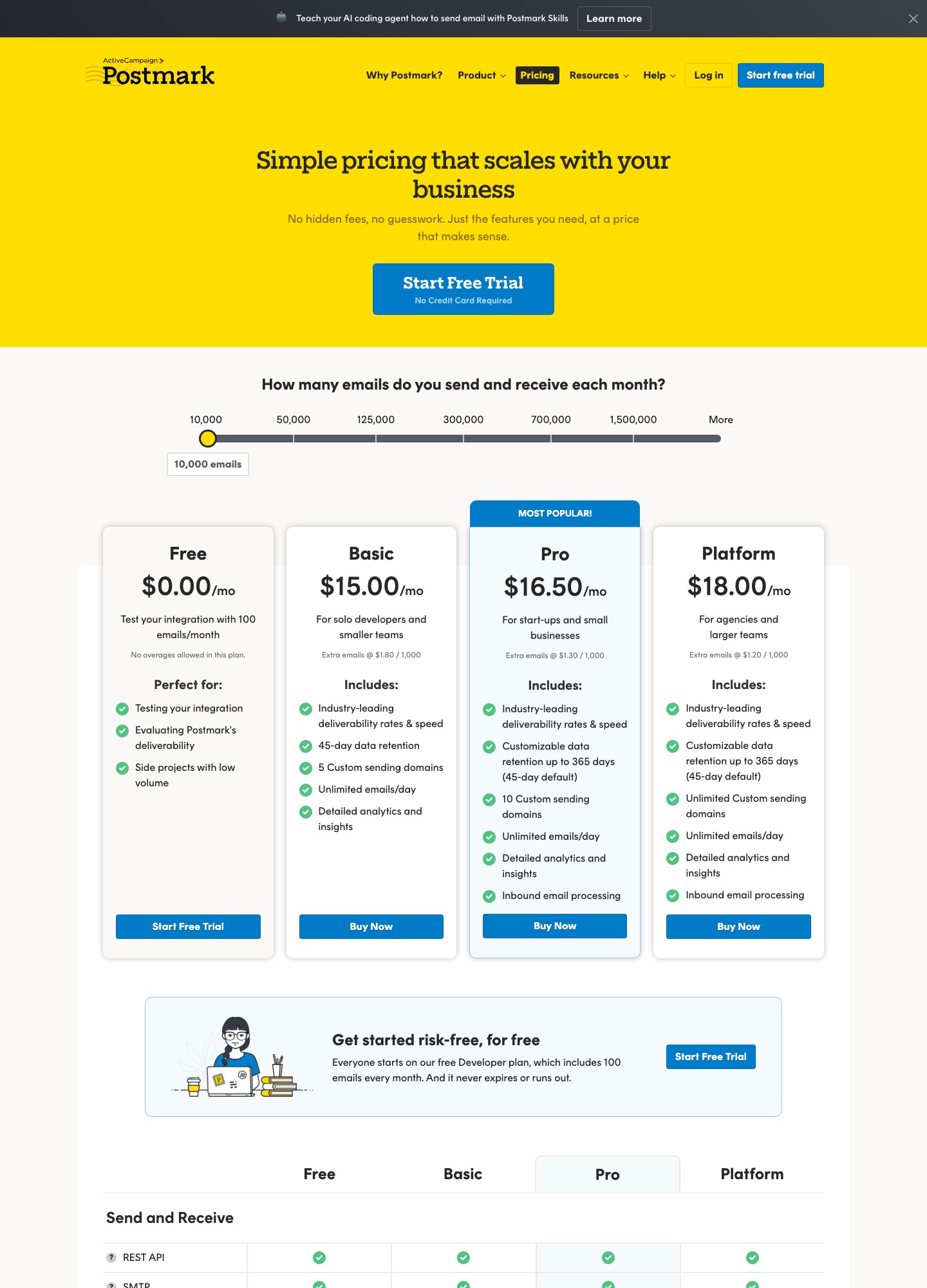
Postmark charges by monthly volume on a slider with stops at 10,000, 50,000, 125,000, 300,000, 700,000 and 1,500,000 emails; its page reads Basic $15, Pro $16.50 and Platform $18 at the first stop, with extra emails at $1.80, $1.30 and $1.20 per 1,000 respectively. Compared with other senders, the cost question is how fast the price climbs from the first stop, which the cost section below sets beside four alternatives.
Why teams leave: six limits taken from the pricing page
| What the page lists | Why it matters for sequences |
|---|---|
| Free plan: 100 emails a month, no overages allowed | Enough to wire up a reset email, not enough to rehearse a five-step onboarding flow against real addresses. |
| Basic $15 at 10,000, $55 at 50,000, $115 at 125,000, $245 at 300,000 | The price per email stays high as volume grows; a sequence multiplies every signup by its number of steps. |
| Inbound email processing listed on Pro and Platform | Reply-to-continue flows need a plan above Basic; the Basic card does not list inbound. |
| 45-day data retention; customisable to 365 days on Pro and Platform | Support cannot look up an onboarding email sent six weeks ago on Basic; longer retention is a plan feature or a $5-a-month add-on. |
| Dedicated IP from $50 a month per IP, for 300,000 emails a month or more on Pro or higher | A dedicated IP of your own is gated by volume and plan, so a sequence-heavy sender below 300,000 emails a month cannot isolate its reputation that way. |
| Broadcast and transactional streams never mix; unsubscribe handling required on broadcast | Every sequence step has to be classified, and a wrong call either skips an unsubscribe link or sends promotional mail down the critical route. |
The second row hides a trap. Staying on a 10,000-email plan and going over is the costly path: the per-1,000 overage rates quoted above are charged on every email past the allowance, and the page's own next price is the $55 stop at 50,000. If a launch will take you past a stop, move the slider first; the overage rate exists to push you up a tier, and it is not a price list.
Ranked alternatives for sequence work
Resend: the default if you want sequences and sending under one roof. Gain: its Marketing tab adds contacts, broadcasts and automations that start from events your code sends, with delays up to 30 days per step, and the Free transactional plan is 3,000 emails a month against Postmark's 100. At 50,000 emails, Pro is $20 on Resend's pricing page, and the Marketing tab reads $40 at 5,000 contacts. Lose: message streams (Resend's domain documentation points to subdomains for separation instead) and 15 days of lookup, since the Free card lists 30 days of data retention against Postmark's default 45. The side-by-side of prices, streams and webhooks already exists, so read Resend vs Postmark rather than a repeat here.
Loops: when marketers should own the flows and the product is software. Gain: Loops' workflows start from contact-added, contact-updated, mailing-list and event triggers, and its transactional page says unsubscribed contacts still receive transactional emails, while hard-bounced and complaint-suppressed addresses receive neither type. Lose: the transactional API sends no unsubscribe link and does not track opens or clicks. Price: free up to the 1,000 newest contacts and 4,000 sends in 30 days; Loops' pricing page reads $99 a month at 9,998 subscribers.
Customer.io: for a team that wants to keep Postmark's delivery. Postmark's integrations page says "With Customer.io, you can craft and send data-driven emails—and use Postmark to power email delivery". Gain: event, segment, date and webhook triggers and a Wait Until block per its trigger documentation. Lose: a second bill and, on Customer.io's pricing page, Essentials from $100 for 5,000 profiles and $145 at 10,000. The page lists 1 million emails a month on Essentials, which looks generous beside Postmark's $245 at 300,000, but profiles are metered too, so a product with many recipients pays on that meter.
Brevo: when you want automation, SMS and transactional API in one inexpensive account. The pricing-plans help article lists Free with 300 email sends a day, Starter from $9 a month with no daily limit, and Standard from $18 a month with automation and A/B testing, both starting at 5,000 emails a month. Lose: pricing is built on email volume tiers, automation is listed on Standard rather than Starter, and the Brevo logo comes off only through a $9-a-month add-on. See Brevo's pricing page.
Mailgun: a straight sender swap if the 50,000 line is the problem. Mailgun's pricing page reads Foundation at $35 for 50,000 emails, with an email template builder and full inbound routing, against $55 on Postmark Basic. Lose: Foundation lists 5 days of log retention and 1 day of message retention, so support lookups shrink from 45 days to 5, and Mailgun lists no sequence builder on that page either.
Amazon SES: when cost per email is the whole case and you already own the scheduler. Amazon SES's pricing page lists Essentials at $0.16 per 1,000 emails. Lose: everything else; suppressions are one list per account and Region, with BOUNCE or COMPLAINT as the only reasons per its suppression list documentation.
SMTP2GO: for a low-volume sender who wants a larger free plan. SMTP2GO's pricing page lists Free at 1,000 emails a month, Starter at $10 for 10,000 ($100 a year) and Professional at $75 for 100,000, with 30 days of reporting. Like Postmark, it is a sender; its page lists no sequence builder.
Cost at 10,000, 50,000 and about 100,000 emails a month
Prices are list prices from each pricing page on 7 October 2026. Postmark has no 100,000 stop, so its 125,000 reading is shown; where another vendor has no stop at a volume, the cell says so instead of guessing. The Amazon SES column is arithmetic: thousands of emails multiplied by the page's $0.16 rate, with attachment data and add-ons left out.
| Emails a month | Postmark (Basic / Pro / Platform) | Resend | Mailgun | Amazon SES | SMTP2GO |
|---|---|---|---|---|---|
| 10,000 | $15 / $16.50 / $18 | Pro $20 (includes 50,000) | Basic $15 | 10 × $0.16 = $1.60 | Starter $10 |
| 50,000 | $55 / $60.50 / $66 | Pro $20 | Foundation $35 | 50 × $0.16 = $8.00 | No 50,000 stop; Professional is $75 at 100,000 |
| 100,000 to 125,000 | At 125,000: $115 / $126.50 / $138 | Pro $35 at 100,000 | Foundation $75 at 100,000 | 125 × $0.16 = $20.00 | Professional $75 at 100,000 |
At 10,000 emails Postmark's $15 is level with Mailgun Basic, $5 under Resend (whose $20 already includes 50,000) and $5 over SMTP2GO's Starter. From 50,000 it is the dearest of the four vendors that publish a reading there. The honest comparison for a sequence reader adds the builder: moving the series to a lifecycle tool costs $99 at 9,998 subscribers on Loops or $145 at 10,000 profiles on Customer.io, on top of whichever sender you keep. Resend's Marketing tab, at $80 for 10,000 contacts on its slider, is the one option where the builder and the sender share an invoice, though the two tabs are priced separately on its page.
Leaving Postmark: what there is to export
Postmark's pages describe no stored audience, so there is no contact file to download; the audience lives in your own database. What you can take is the suppression lists, the templates and the recent activity. Suppressions are per stream: the suppressions API reference gives a dump endpoint under each stream's id, filterable by reason (HardBounce, SpamComplaint, ManualSuppression), by origin (Recipient, Customer, Admin) and by date. Run it once for the transactional stream and once for each broadcast stream, and keep the reason and origin fields, which are the only record of why an address was blocked. The same page limits creating or deleting suppressions to 50 per call, which matters if you are loading them back in.
Templates come out through the templates API: one call lists them with ids and aliases, and a second per template returns the HTML and text bodies and the subject. Activity history is the awkward one: with a 45-day default, anything older is gone, so decide what you need before your last send and export it then.
Consent and suppression traps when leaving Postmark
- Unsubscribes were Postmark's job. On a broadcast stream, unsubscribe handling defaults to Postmark's own, so opt-outs are recorded on Postmark's side and you may hold no copy. If you miss a stream in the dump, those people receive their next sequence email from the new tool.
- Labels may not map. Amazon SES accepts only BOUNCE or COMPLAINT as reasons for imported entries and requires production access for bulk jobs, so a manual suppression has no matching label; hold opt-outs in your own table or accept the bounce label. Resend's suppressions page offers CSV import and a manual reason, with up to 100 addresses per batch call through the API.
- Loops and Customer.io take opt-outs as contact fields. Loops reads a
Subscribedcolumn set to false (CSV upload); Customer.io reserves anunsubscribedattribute (CSV import). Neither is a suppression list, so your audience file must carry the flag on every row. - Spam complaints are permanent at Postmark. Its reference states that SpamComplaint suppressions cannot be deleted, so treat any of those addresses as blocked everywhere.
An overlap plan, day by day
- Day 1: dump suppressions for every stream and save the files. List the templates and fetch the body of each.
- Day 2 and 3: verify a new sending subdomain at the destination. Postmark's DKIM and Return-Path records stay where they are.
- Day 4 to 7: load suppressions and opt-outs; send the lowest-risk mail type (product notifications, say) to seed addresses you own.
- Day 8: route that one mail type live. Leave receipts and resets on Postmark.
- Day 15: move the sequences. Because your code owns the schedule, the cutover is a switch in the sender call, not an in-flight migration.
- Day 30: move receipts and resets last, watching bounce handling closely.
- Day 31: export the activity you want, then cancel. Postmark's inbound MX records, if you use them, move after the new handler is proven. Steps that apply to any destination are collected in the migration guide.
Three setups where staying on Postmark is the better call
First, a product at 50,000 emails a month whose onboarding is two scheduled messages from your own job queue: Postmark at $55 to $66 buys separate streams and 45 days of lookup, and a switch would save $35 to $46 a month while costing a rewrite of webhook handling. Second, a team that already pairs Postmark with Customer.io, where the builder exists and Postmark is the reason mail arrives. Third, any mail where a reset or invoice failing to land costs more than the price gap. If your problem is only the bill, price a sender swap; if it is the builder, add a tool rather than abandon a sender that works. More options for each case are on the transactional and developer pages, the tool directory and the alternatives hub.
Frequently asked questions
Does Postmark have automations or drip campaigns?
No. Postmark's message-streams page says the product lacks list uploads, a WYSIWYG editor and campaign-based reporting, and its guide for people coming from ActiveCampaign tells readers to use ActiveCampaign for marketing automation and journeys. A sequence on Postmark means your own code deciding when each email goes and calling the API, usually with a stored template per step.
Can I keep Postmark for delivery and add a sequence tool on top?
Yes, and Postmark's own integrations page lists Customer.io as a tool that crafts and sends data-driven emails while Postmark powers delivery. The catch is two vendors to bill, two suppression lists and two places to look when something does not arrive. It makes sense when Postmark's delivery is the reason you are staying and the only gap is the builder.
At what volume does leaving Postmark start to save real money?
Look at the 50,000 stop. Basic is $55, Pro $60.50 and Platform $66 there, while Resend's Pro plan lists 50,000 emails for $20 and Mailgun's Foundation lists $35. Below about 10,000 emails a month, Postmark's $15 Basic is competitive and the saving from leaving is small.
What happens to my unsubscribes and bounces when I leave?
They live in Postmark's suppression lists, one set per message stream, and nothing moves on its own. Pull a dump from each stream, keep the reason and origin fields, and load them into the new tool before the first live send. Postmark's reference notes that spam-complaint suppressions cannot be deleted, so those entries are a permanent record you should carry across.
Is Amazon SES a drop-in replacement for Postmark?
For sending, mostly; for everything around it, no. SES lists Essentials at $0.16 per 1,000 emails, which makes 50,000 emails $8, but its suppression list is kept per account and Region, accepts only bounce or complaint as the reason for entries you add, and its pricing page describes nothing like Postmark's named message streams. Teams that choose it accept building their own dashboards and rules.