Customer.io Alternatives for Email Sequences
Leave Customer.io if your sequences are email-driven and the bill is the problem. Essentials reads $100 a month at 5,000 profiles, $145 at 10,000 and $235 at 20,000, and a profile you delete still bills for the month it existed. Loops is the default replacement for that case, at $99 for 9,998 subscribers with no seat or per-send fees. Userlist is the pick when messages should follow a company rather than a person. Stay if the same workflows also send push, in-app, WhatsApp or SMS, if you model companies as objects, or if you qualify for the Startup Program's free year.
Every Customer.io figure here comes from Customer.io's pricing page and its docs, and every replacement price from that vendor's own page, all read on 7 October 2026. The vendors count different things (profiles, subscribers, active users, tracked users), so the cost table says what each number counts before you compare it.
What you would be leaving
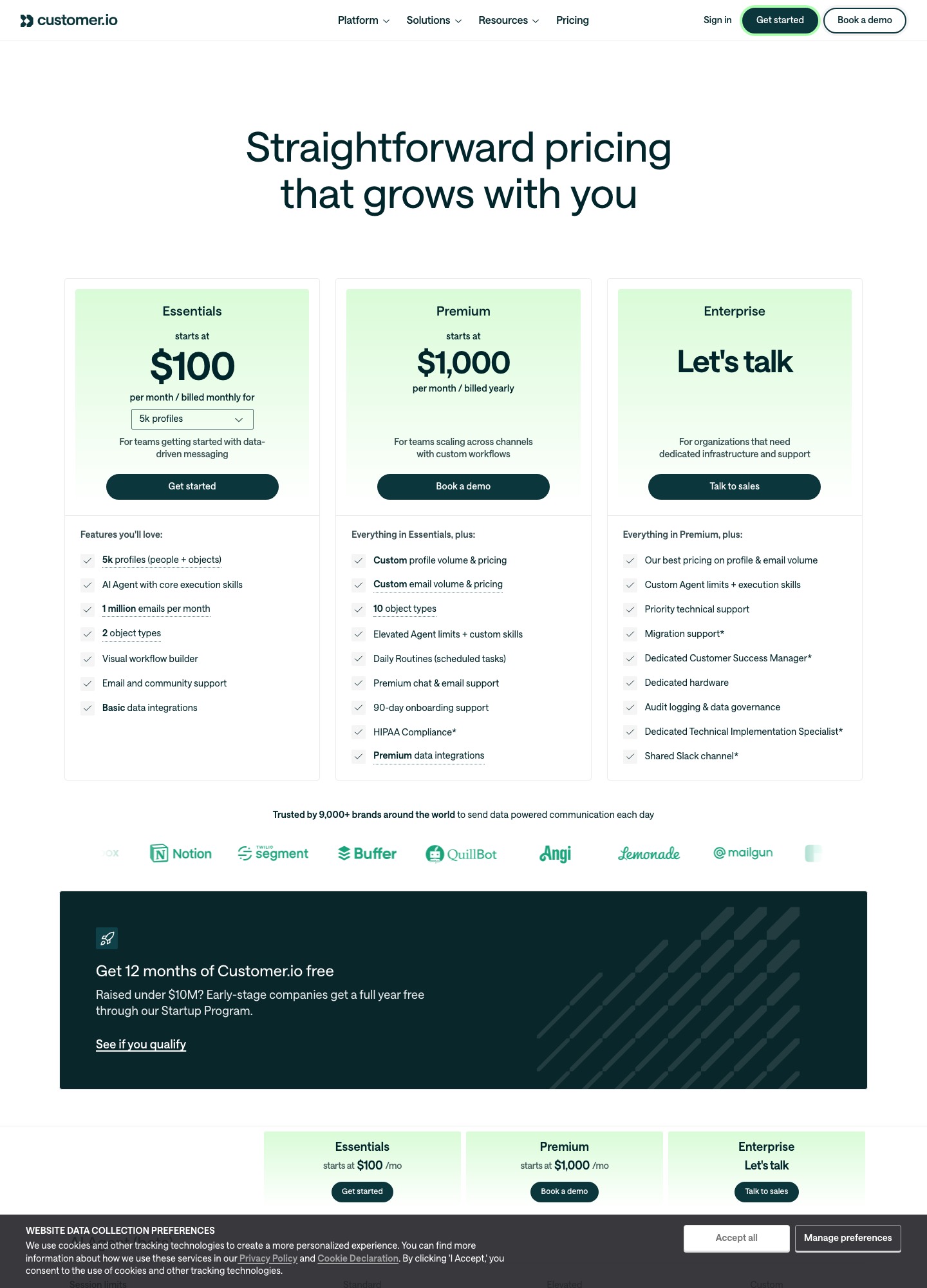
Essentials is $100 a month billed monthly for 5,000 profiles, and the profile selector moves to $145 at 10,000 and $235 at 20,000. Premium starts at $1,000 a month billed yearly with custom profile and email volume. The ladder, overage rates and the full plan grid are on the vendor's page, so this page spends its words on leaving rather than repeating them.
Why teams outgrow Customer.io Essentials
A deleted person still bills for the month
Customer.io's billing docs describe a high-watermark model: "If a profile exists at any point during the billing period, it counts towards your bill for that month—even if you delete it." The worked example starts a cycle with 3,000 profiles, adds 250, deletes 50 and bills 3,250. A profile deleted and re-added in the same period counts as two, and the docs call integrations that re-add deleted profiles a common source of unexpected increases. Plans & Billing also counts profiles in every workspace, including ones named test, dev or sandbox, and the same person in two workspaces counts twice. Essentials includes 2 workspaces, so a staging copy of production is the usual way to pay for the same people twice.
Objects count as profiles
The Essentials card reads "5k profiles (people + objects)" and the overage line reads "Additional people & object profiles $0.009". For a B2B product that stores each company as an object, the count is people plus companies, and the plan lists 2 object types on Essentials against 10 on Premium. A team with 4,000 users and 1,200 company objects is at 5,200 profiles, past the first selector stop, before it has sent anything.
Essentials leaves out what a grown team asks for
The comparison grid on the pricing page marks managed deliverability, custom role-based permissions, chat support, onboarding support and anonymous messages as "Not included" on Essentials, and "Included" on Premium and Enterprise. Essentials support is email and community, with documentation. If a deliverability dip lands on a Tuesday, the plan that offers managed help is the $1,000-a-month one.
The next step up is a different price class
Premium starts at $1,000 a month billed yearly, which is 12 x 1,000 = $12,000 committed in a year. Essentials at 20,000 profiles is $235 a month, or 12 x 235 = $2,820 a year, so moving up buys managed deliverability and onboarding at roughly four times the annual cost (12,000 / 2,820 is 4.3). The selector for 50,000 or more profiles reads "$505+", and the Essentials plan is billed monthly while Premium is billed annually, so the move changes the commitment as well as the price.
Some integrations are tiered
Essentials lists "Basic data integrations", Premium lists "Premium data integrations", and the grid's data row reads "Basic" for Essentials and "Basic & Premium" above it. The page does not say here which sources sit in each set, so ask Customer.io before you design a warehouse sync around the cheaper plan.
Eight replacements, ranked for a SaaS team leaving Customer.io
1. Loops: the default when cost is the reason
Suits: email-only journeys that start at signup, on a plan change or on an event. What you gain: the price, and a smaller product to run. Loops' pricing page charges no team-seat fee, includes transactional sending on paid plans and does not count unsubscribed contacts. Its trigger docs list four triggers: Contact added, Contact updated, Contact added to list and Event received. Contact updated can be narrowed to one value moving to another, such as free to paid. What you lose: the workflow builder has six node types (Trigger, Email, Timer, Audience filter, Branch and Experiment), so there is no push, SMS or in-app node, and the branching docs say workflows do not allow circular paths. Price: free for the 1,000 newest contacts with 4,000 sends per rolling 30 days; the paid slider read $48 at 4,788 subscribers, $99 at 9,998, $198 at 24,339 and $249 at 49,989.
2. Userlist: when the company is the unit
Suits: B2B SaaS where a workflow should fire when someone joins or leaves an account. Userlist's features page lists properties for users, companies and relationships, a separate set of company segments, looping, goals and split testing in up to 5 paths. What you lose: the price advantage. Userlist's Basic plan is $149 a month for up to 10,000 users, so it does not undercut the $145 that Customer.io shows at 10,000 profiles. Its A/B split testing and conversion goals are listed on the Professional plan, at $349 a month for up to 10,000 users. The features page names no push or SMS. Price: Userlist's pricing page reads Basic $149 at 10,000 users, $229 at 18,000 and $369 at 32,000, with $10 a month per extra 1,000 users.
3. Bento: the lowest published entry price
Suits: small SaaS teams that want flows, a CRM view and deliverability tools in one plan. Bento's pricing page lists Marketing Platform at $29 a month for up to 5,000 active users, unlimited marketing sends and no seat fees, then $0.01 per additional active user. Transactional email is a separate product, free for the first 100 emails a month and from $5 a month for up to 12,500. Watch: the page defines an active user as "subscribed users or people with an event in the last 30 days", so a product that fires many events can push the active count above its subscriber count. The $30 Bento Chat add-on, which brings SMS and WhatsApp through outside providers, needs an active Marketing plan.
4. Resend Marketing: when engineers own the sends
Suits: a team that already sends product email through Resend's API and wants sequences next to it. Resend's Marketing tab read free at 1,000 contacts with 10,000 automation runs and 3 segments, then the slider shows $40 for 5,000 contacts, $80 for 10,000 and $180 for 25,000. The page also lists automations at $0.0015 per run, so confirm how the included runs and that rate combine on your plan. What you lose: Resend sells sending first, so test a journey with your real waits and branches before assuming parity with a lifecycle tool. Its comparison with Loops covers that trade in more depth.
5. Encharge: SaaS flows at a higher price
Suits: a team that wants a SaaS-focused flow builder and a HubSpot or Salesforce link. Encharge's pricing page lists Growth at $99 a month for 2,000 subscribers with unlimited flows and team members, and Premium at $159 adding HubSpot, Salesforce and transactional email. Monthly readings are Growth $179 at 5,000, $249 at 10,000 and $389 at 25,000; Premium $269, $399 and $649. The catch: Customer.io's selector shows $100 at 5,000 profiles, so Encharge's 5,000-subscriber reading above is the dearer one. Move for the editor and integrations, never for the bill.
6. ActiveCampaign: when sequences end in a sales call
Suits: product-led companies whose trial sequences hand people to a sales team. ActiveCampaign's pricing page reads Plus at $145 a month for 5,000 contacts, $189 at 10,000 and $389 at 25,000, billed annually, and Starter caps each automation at 5 actions, so Plus is the realistic plan. Its comparison grid lists custom event tracking and API & webhooks, but the text does not show which plans carry them, so confirm before relying on product events. What you lose: contact-based billing and an annual commitment.
7. Brevo: a free plan for a quiet list
Suits: a pre-launch or low-volume product testing sequences. Brevo's plan article describes a free plan with 300 daily email sends and 2,000 contacts in marketing automation, Starter from $9 a month and Standard from $18, which adds automation, A/B testing and advanced reports. What you lose: the daily cap bites the day a launch goes out, and nothing on those pages describes a product-event model like Customer.io's.
8. Plunk: pay per email, open source
Suits: a developer-run product with a modest list. Plunk's pricing page lists a free plan of 1,000 emails a month with Plunk branding, then $0.001 per email, unlimited contacts, workflow automation and an AGPL-3.0 licence you can self-host. What you lose: per-email pricing rewards a sparse sequence. 10,000 people receiving 6 emails a month is 60,000 emails, or 60,000 x $0.001 = $60, but adding a weekly newsletter to the same people is another 4 x 10,000 = 40,000 emails, or $40 more.
What the same audience costs at 5,000, 10,000 and 25,000
All figures are US dollars a month. Customer.io is Essentials billed monthly, ActiveCampaign is Plus billed annually, and each other plan is the monthly reading. "Count" says what the vendor bills on; where a vendor has no reading at a size, the nearest one is named.
| Size | Customer.io (profiles) | Loops (subscribed) | Resend Marketing (contacts) | Encharge Growth (subscribers) | Userlist Basic (users) | ActiveCampaign Plus (contacts) |
|---|---|---|---|---|---|---|
| 5,000 | $100 | $48 (4,788 subscribers) | $40 | $179 | $149 (lowest stop is up to 10,000) | $145 |
| 10,000 | $145 | $99 (9,998 subscribers) | $80 | $249 | $149 | $189 |
| 25,000 | no stop: $235 at 20,000, $325 at 30,000 | $198 (24,339 subscribers) | $180 | $389 | $369 (nearest stop is 32,000) | $389 |
Bento is $29 for up to 5,000 active users and then $0.01 per extra active user, and Plunk bills per email, so neither fits a fixed-size column. Over a year at 10,000 contacts, Customer.io comes to 12 x 145 = 1,740 and Loops to 12 x 99 = 1,188, a gap of 1,740 - 1,188 = 552 dollars. Resend is 12 x 80 = 960, which is 780 under Customer.io. At 5,000 the Loops reading saves 12 x (100 - 48) = 624 a year. The 25,000 row compares different audiences on purpose: even against Customer.io's smaller 20,000 reading, Loops' 24,339-subscriber reading is 235 - 198 = 37 lower per month.
Two assumptions can overturn this. Customer.io includes 1 million emails a month on Essentials, so a heavy sender is not penalised there, while Plunk's per-email rate is. And objects raise Customer.io's profile count but add nothing to Loops' subscriber count, so a company-heavy product should recount its own audience before trusting any single column.
Getting people, consent and suppressions out of Customer.io
- Export the people. Customer.io's export docs say to open People, use the Export to CSV dropdown and pick All attributes, Displayed attributes, Choose attributes or Export other. The id attribute is always included. Turning on the filters toggle lets you export by segment, and a segment-filtered file adds a column named like _segment:25 holding UTC timestamps. Relationships come out as a separate CSV keyed by cio_id.
- Check the file's reach. The same docs say exports expire after 60 days, that an export of more than 2 million relationships fails, and that exporting by the email-address filter is not supported. A file holds all attribute data for the chosen people, so purge sensitive attributes before it leaves your hands.
- Carry both unsubscribe fields. The unsubscribe docs describe a reserved attribute called unsubscribed, where true means unsubscribed from email, SMS, WhatsApp and push. Topic preferences live in cio_subscription_preferences. The export page does not mention either, so pick them with Choose attributes and confirm the columns exist in the file.
- Handle the hashed list differently. The workspace suppression page gives an Export CSV under Workspace Settings, Workspace Suppressions, holding cio_id, id_sha256 and email_sha256. The hashes are one-way, so you cannot import it as addresses. Hash each address in your people file the same way and drop the ones that match, after checking one known suppressed address to confirm how the docs' lowercase hexadecimal output is built.
- Pull bounces and complaints. The email suppression page says the list of hard bounces, spam complaints and API-suppressed addresses sits under Workspace Settings, Email, Suppression List for admins, and that the ESP Suppression API lists addresses by reason. Load them as suppressed in the new tool if it accepts that, and leave them out if it does not.
- Mind the new tool's import rules. Loops' CSV upload docs mark new contacts subscribed unless the file has a Subscribed column set to false, and do not re-subscribe anyone already unsubscribed. Userlist's import docs say imported users are automatically opted in, so there, keep unsubscribed rows out of the file entirely and use them as your own do-not-send list.
- Accept that journeys do not travel. None of the pages above describe exporting workflow or campaign definitions. Screenshot each journey, copy the message HTML or text from the editor, and write down timers and exit rules.
- Check where the data lives. Customer.io's pricing page lists US and EU data centers and publishes a DPA. This page makes no hosting claim about the replacements, so read each one's own DPA before moving EU contacts.
A 21-day overlap that keeps consent intact
- Days 1 to 2: take the first export, run the hash check, authenticate the new sending domain and import the cleaned file with workflows switched off.
- Days 3 to 7: rebuild the welcome and onboarding journeys, and run them to internal addresses and two throwaway signups.
- Day 8: point new signups at the new tool. Everyone already inside a Customer.io journey finishes it there.
- Days 9 to 20: rebuild trial-ending, upgrade and win-back journeys one at a time. Watch bounces and complaints on the new account before adding the next.
- Day 21: export again, copy every unsubscribe and bounce made since day 1 into the new tool, switch the last Customer.io workflow off and cancel before the next billing date. The docs bill plan fee plus overages from the previous month, so a cancellation on day 21 still carries one more invoice. On Premium, line this up with the annual term instead.
Wider guidance on moving a sequence between tools is in the email sequence tools migration guide, and the SaaS onboarding sequences guide covers what to rebuild first.
When staying on Customer.io is the right call
- You are in the Startup Program. The pricing page offers a full year free to companies that have raised under $10M. A migration costs engineering time you would not get back.
- Email is not the only channel. The grid lists unlimited push and in-app, native WhatsApp, LINE and custom SMS volume, and Loops' node list has none of them. A journey that falls back from email to push is the case to keep.
- You sit near 5,000 profiles on Essentials' entry plan. At that size the Resend and Loops readings above save 100 - 40 = 60 and 100 - 48 = 52 dollars a month, which rarely pays for a rebuild.
- You are partway through a Premium year. Twelve payments of $1,000 are committed, so schedule the move for renewal.
If you are weighing a specific pair, read Customer.io vs Loops, Userlist vs Customer.io or Customer.io vs Drip. The wider lists sit at all alternatives and the tool directory, and if you are leaving Loops or Userlist instead, see Loops alternatives and Userlist alternatives.
Frequently asked questions
Does deleting profiles lower my Customer.io bill straight away?
No. Customer.io's billing docs say a profile that exists at any point in the billing period counts for that month even if you delete it, so a clean-up only helps the following cycle. The same page says a profile deleted and re-added in one period counts twice, which is why an integration that keeps re-creating people can inflate the count. Delete only after the replacement tool holds the data.
Can I export my Customer.io workflows and campaigns?
The export docs cover people, relationships and the GDPR suppression list, and they do not describe a file that carries workflow or campaign definitions. Plan to rebuild each journey by hand in the new tool. Before cancelling, write down every trigger, wait, branch and exit condition, and copy the message content out of the editor.
Is Loops actually cheaper than Customer.io Essentials?
On the published readouts, yes: Loops' pricing page read $99 at 9,998 subscribers where Customer.io's selector read $145 at 10,000 profiles. The units differ, though. Loops counts subscribed contacts only, while Customer.io counts people plus object profiles, so a company with many accounts modelled as objects sees a wider gap than the headline suggests.
What happens to people who unsubscribed in Customer.io?
A global unsubscribe sits in the reserved boolean attribute named unsubscribed, and topic choices sit in cio_subscription_preferences, so export both columns. The separate GDPR suppression export contains only SHA-256 hashes of ids and emails, which means you can check addresses against it but cannot import it as a list. Run a second export just before cutover to catch anyone who opted out during the overlap.
Should I wait for the Startup Program year before leaving?
If you qualify, probably. Customer.io's pricing page offers a full year free to early-stage companies that have raised under $10M, and nothing in that offer is worth trading for a migration project. Use the free year to cut unused profiles and to document the journeys you would rebuild, then compare prices again 60 days before it ends.