Loops Alternatives for Email Sequences
Leave Loops when the workflow builder, not the price, is what stops you. It offers four triggers and six node types, sends a contact down only the first branch it matches, allows no circular paths, and has no push or SMS node. Customer.io is the default replacement for that reason. Its selector reads $145 at 10,000 profiles, and the gap to the $99 that Loops reads at 9,998 subscribers is the price of the extra depth. Userlist is the pick for B2B accounts. Stay if your journeys run from signup to paid: Loops reads $48 at 4,788 subscribers and $249 at 49,989, with no seat or send fees.
Prices below come from Loops' pricing page, its docs and each alternative's own page, read on 7 October 2026. Vendors bill on different counts, so the cost table names the count beside every figure.
Decide first: which problem are you actually having?
| What is going wrong | What the vendor pages say | Move |
|---|---|---|
| Journeys need push, SMS or in-app steps | Loops' workflow nodes are Trigger, Email, Timer, Audience filter, Branch and Experiment | Customer.io |
| Messages must follow a company, not one person | Userlist lists company segments and join or leave triggers; the Loops docs read here describe contacts, properties, lists and events | Userlist |
| A journey needs a repeat loop or a goal window | Loops branches never route back; Userlist lists looping and goals | Userlist |
| Older contacts are not getting mail | The free plan sends only to the 1,000 newest contacts | Stay and upgrade, or Resend's free tier |
| Bill at tens of thousands of subscribers | Loops reads $249 at 49,989; Resend Marketing reads $250 at 50,000 | Little to gain; stay |
Loops' plans, in two sentences
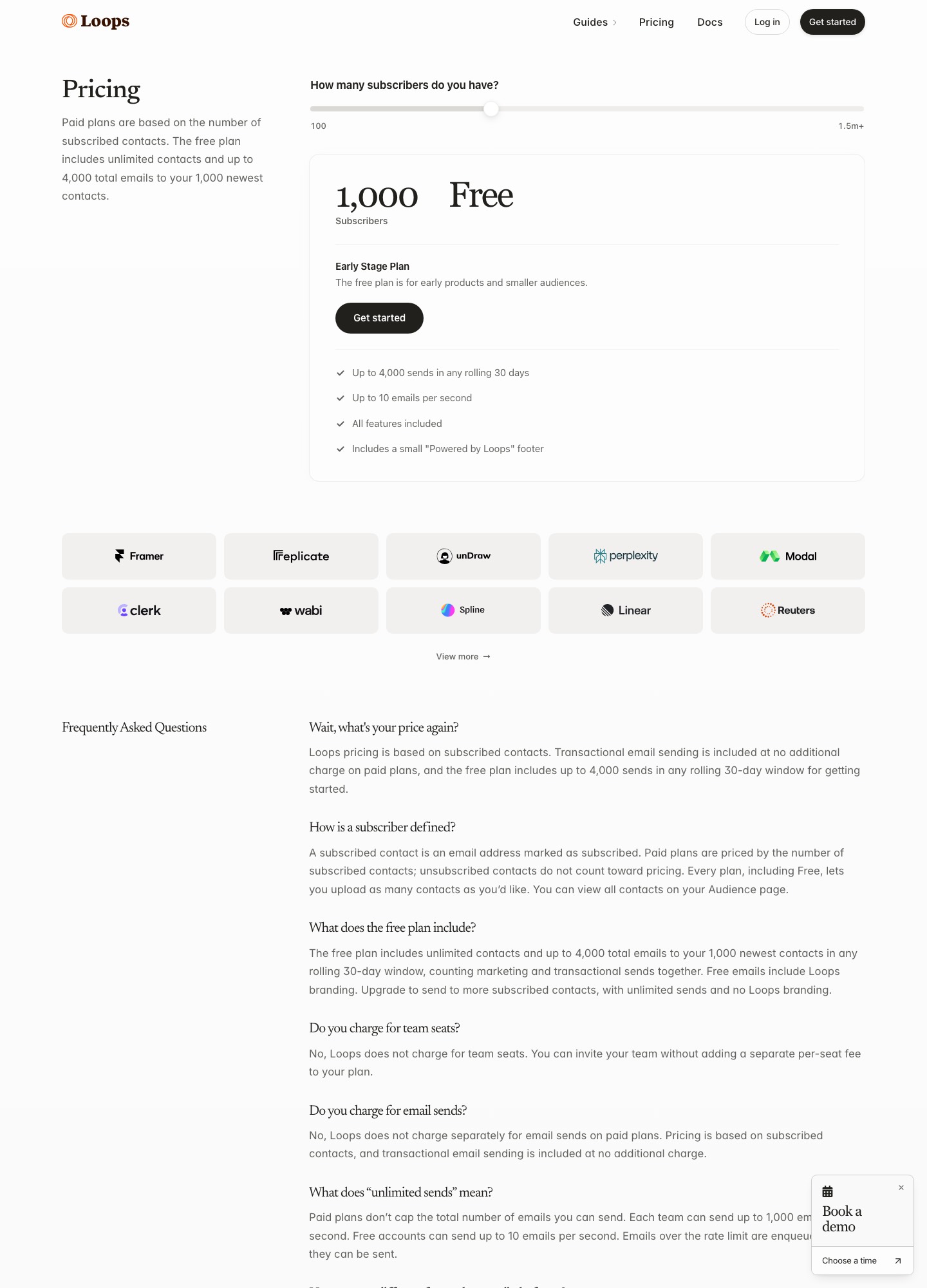
The free Early Stage Plan allows 4,000 sends in any rolling 30 days to your 1,000 newest contacts, with a "Powered by Loops" footer. Paid plans charge by subscribed contacts, and the slider read $99 at 9,998 subscribers and $249 at 49,989; the page says unsubscribed contacts do not count and that it charges no seat fee and no separate fee for sends.
Where Loops runs out for sequence work
The free plan quietly narrows your audience
The pricing page says the free plan includes unlimited contacts but sends to your 1,000 newest, and that marketing and transactional emails share the 4,000-send allowance. Each new signup therefore pushes an older contact out of reach. A product that added 400 users this month and sends a five-email onboarding to each (400 x 5 = 2,000 sends) has used half the allowance before a single product announcement goes out.
A branch takes the first match and nothing else
The branching docs say each branch begins with an audience filter, filters are checked left to right, and "the contact will proceed to the first matching filter and the remaining filters are skipped". A contact matching none exits the workflow. The page states no cap on the number of branches, but it also says workflows do not allow circular paths, so a "keep nudging until they activate" loop has to be built as a chain of timers instead.
State lives in one contact property
Loops' lifecycle recipe drives its onboarding, new-subscriber, dunning and churn workflows from a custom property named subscriptionStatus. Your product sets it with a PUT to the update-contact endpoint, and each workflow starts from a Contact updated trigger on one value, set to run every time. That is tidy for one user per contact. The docs read here describe contacts, properties, lists and events, and none of them describes company or account records, so account-level logic has to be encoded in properties you maintain yourself.
Email is the only node type
The workflow docs list six nodes: Trigger, Email, Timer, Audience filter, Branch and Experiment. A journey that should fall back from email to a push or SMS message has nowhere to put that step.
Imports do not start workflows by default
The trigger docs say contacts uploaded by CSV or added by hand are not picked up by a Contact added trigger, and that re-triggering means re-uploading with the "Trigger workflows" toggle on. It is a sensible safeguard, but a backfill of existing users into a new onboarding journey becomes a manual step.
What the same audience costs at 5,000, 10,000 and 50,000
US dollars a month. Customer.io is Essentials billed monthly, Encharge is Growth and Userlist is Basic. "Count" is what each vendor bills on: subscribed contacts for Loops, profiles for Customer.io, contacts for Resend, subscribers for Encharge, users for Userlist and active users for Bento. Where a vendor shows no reading at a size, the table says so rather than extending a rate.
| Size | Loops | Customer.io | Userlist | Resend Marketing | Encharge | Bento |
|---|---|---|---|---|---|---|
| 5,000 | $48 (4,788 subscribers) | $100 | $149 (lowest stop is up to 10,000) | $40 | $179 | $29 (up to 5,000 active users) |
| 10,000 | $99 (9,998 subscribers) | $145 | $149 | $80 | $249 | $0.01 per extra active user above 5,000; no 10,000 reading |
| 50,000 | $249 (49,989 subscribers) | $505+ (selector reading for 50,000 or more) | no reading; $369 at 32,000 | $250 | no reading; $389 at 25,000 | no reading |
At 10,000 the gap between Customer.io and Loops is 145 - 99 = 46 a month, so Customer.io's extra channels and objects cost 46 x 12 = 552 dollars a year at that size. At 50,000 the same comparison is 505 - 249 = 256 a month, or 3,072 a year. Resend's 50,000 reading is within one dollar of Loops (250 - 249), so leaving for price alone gains nothing at that size, and Resend charges for transactional sending separately: its Pro plan lists 50,000 emails for $20 a month.
Encharge is the clearest case of a higher price buying something different. Growth at 10,000 subscribers reads $249 against Loops' $99, and its page ties monthly email sends to your subscriber limit, so 10 x 10,000 = 100,000 sends a month on Growth. Loops' pricing page lists no send cap on its paid plans.
Seven alternatives, in the order a Loops user should look at them
1. Customer.io: for journeys that outgrow email
Customer.io's plan grid lists unlimited push and in-app messages, native WhatsApp, LINE, custom SMS volume, A/B and multivariate testing, conversion tracking, send-time optimization and unlimited user seats on Essentials. It also lists 2 object types, so companies can be modelled beside people. Essentials is $100 a month at 5,000 profiles, $145 at 10,000 and $235 at 20,000, and early-stage companies that have raised under $10M can claim a free year through its Startup Program. The trade: the billing docs count every profile that existed in the period, deleted or not, and the profile total includes objects. Loops customers who run a staging workspace should expect to pay for it. The pair is compared in Customer.io vs Loops.
2. Userlist: for B2B accounts and repeating journeys
Userlist's features page describes workflows that trigger when a user joins or leaves a company, company-level segments, multiple triggers on one workflow, looping until an outcome occurs, goals with custom time windows and split paths. Its pricing page reads Basic $149 a month at up to 10,000 users and Professional $349, with $10 and $12 a month for each additional 1,000 users, and A/B split testing, conversion goals and advanced workflow features are listed on Professional. The billing docs add a message allowance of 5 times your tracked users with a 500,000 floor and $1 per 1,000 extra messages. There is no free plan; the docs describe a 14-day trial.
3. Encharge: SaaS flows with sends tied to list size
Encharge's pricing page lists Growth at $99 a month for 2,000 subscribers with unlimited flows and team members, and Premium at $159 with HubSpot, Salesforce and transactional email. Growth lists monthly email sends of 10 times the subscriber limit and Premium 12 times, and the page says it charges $100 for every 100,000 emails sent. That send ceiling is the number to test against a busy product, because the Loops pricing page lists no cap on sends for paid plans.
4. Bento: the cheapest published start
Bento's pricing page lists Marketing Platform at $29 a month for up to 5,000 active users, with automations, a CRM and deliverability tools, unlimited marketing sends and no seat fees. There is no free plan, only a 30-day trial. The page says Bento helps relocate lists, forms, core automations, chat setup and transactional email, and that you can share an invoice during the trial for a price-match and credit review. Its active-user definition, "subscribed users or people with an event in the last 30 days", differs from Loops' subscribed-only count.
5. Resend Marketing: the free tier that replaces Loops' free tier
Resend's Marketing tab read free at 1,000 contacts with unlimited broadcast sending, 10,000 automation runs and 3 segments, then the slider shows $40 for 5,000 contacts, $80 for 10,000, $180 for 25,000 and $250 for 50,000. If you leave Loops only because older contacts stopped getting mail, this is the cheapest way to keep a 1,000-contact list working, and a Loops versus Resend comparison covers the rest. The transactional side is a separate product on the same page, with a free plan of 3,000 emails a month capped at 100 a day.
6. Brevo: for a small list and a daily send cap
Brevo's plan article describes a free plan with 300 daily email sends and 2,000 contacts in marketing automation, with paid Starter from $9 a month and Standard from $18 adding automation, A/B testing and advanced reports. It says the email volume you select sets your tier, which is the opposite of Loops' contact-based, unlimited-send model, so a launch-day burst is the thing to price.
7. Plunk: per-email pricing and a licence you can self-host
Plunk's pricing page lists a free plan of 1,000 emails a month, then $0.001 per email, with unlimited contacts, workflow automation and an AGPL-3.0 licence. Against Loops' $99 reading at 9,998 subscribers, the break-even is 99 / 0.001 = 99,000 emails a month, about 9.9 emails per person for a 10,000-person list. Below that Plunk is cheaper, above it Loops is.
Moving off Loops without losing consent
- Download the audience. Loops' export docs say to click the three-dot menu in the filter box on the Audience page and choose Download. The CSV has a column for each contact property, default and custom, and can be limited by filters or saved segments. Confirm the file includes the subscribed column before you rely on it.
- Keep unsubscribed contacts in the file. The CSV upload docs advise keeping them in the audience because deleting and re-adding may leave them subscribed, and the pricing page says they do not count toward your bill. So do not delete them on the way out; they cost nothing.
- Remember the transactional exception. The same page notes that unsubscribed contacts still receive transactional email. A replacement may treat them differently, so decide whether password resets and receipts go through the new marketing tool or a separate sender.
- Re-send events from your own code. The export docs describe contact properties, not event history. Workflows that start from an Event received trigger need your product to send the same events to the new tool.
- Check list membership. Loops has a Contact added to list trigger, so see how list membership appears in the download and recreate each list or tag in the destination before importing.
- Rebuild the exit rules deliberately. Loops audience filters have two modes: "All following nodes" removes a contact who stops matching, "Next node only" checks once. The destination may only offer an exit condition per journey, so map each filter you used.
- Load without starting journeys. Import into the new tool with workflows switched off, then enable them one at a time. The destination may enrol imported contacts into any workflow whose condition they already meet.
A 14-day overlap
- Day 1: download the audience, split the unsubscribed rows into their own file and import the rest with workflows off.
- Days 2 to 4: rebuild the welcome and onboarding journeys and send them to your own addresses.
- Day 5: start sending each product event to both tools, so the new workflows see live traffic while Loops keeps running.
- Days 6 to 10: move new signups to the new onboarding journey. Contacts already partway through a Loops workflow finish it there.
- Days 11 to 13: rebuild the paid-user, dunning and churn emails from the lifecycle recipe's list.
- Day 14: download the audience again, copy every unsubscribe made since day 1 into the new tool, stop the Loops workflows and check the Loops billing date before the next charge. The pricing text read here states no billing term, so confirm it in the account.
The migration guide covers the general sequence of a switch, and welcome sequences for SaaS teams shows what to rebuild first.
When staying on Loops is the right call
- Your journeys are signup to paid. A seed-stage product with an onboarding series, an upgrade nudge and a failed-payment notice is exactly the set the lifecycle recipe lists. At 4,788 subscribers that is $48 a month.
- You are under 1,000 contacts and 4,000 sends. The free plan covers it, and the other free tiers carry caps of their own: Resend's 3 segments, Brevo's 300 sends a day, Plunk's 1,000 emails.
- You value having no send or seat bill. Paid Loops charges neither, so a busy month costs the same as a quiet one.
- You would be moving only for price. At 50,000 the Resend reading is one dollar higher in the monthly column, so that move changes nothing.
Other starting points: all alternatives, the tool directory, Customer.io alternatives and Userlist alternatives.
Frequently asked questions
Why does my Loops free plan skip some of my contacts?
The free plan covers up to 4,000 sends in any rolling 30 days, and those go to your 1,000 newest contacts. Marketing and transactional sends count toward the same 4,000, and every email carries Loops branding. Contacts beyond the newest 1,000 stay in the audience but are not mailed until you move to a paid plan.
Can a Loops workflow loop back or run two branches at once?
Not in the current branch node. The branching docs say workflows do not allow circular paths, and that a contact takes only the first branch whose audience filter it matches, or leaves the workflow if it matches none. Branches built before that change keep parallel paths until you press Upgrade Branch Node. If a journey needs a repeat loop, look at Userlist, whose features page lists looping.
Is anything cheaper than Loops at 10,000 subscribers?
On the published readouts, Resend's Marketing slider reads $80 at 10,000 contacts against Loops' $99 at 9,998 subscribers. Resend splits transactional sending into its own plans, though, while Loops includes it on paid plans, so add that line before you compare. Bento and Brevo price on different units again, so count your own audience in each tool's terms.
What happens to unsubscribed contacts when I export from Loops?
They stay in your audience unless you delete them, and Loops does not charge for them. Its CSV docs advise keeping them there because deleting and re-adding a contact may leave it subscribed. Download the audience, keep the subscribed column, and treat every false value as a do-not-send entry in the next tool.
Which replacement keeps Loops-style flat pricing without seat fees?
Bento's pricing page lists no seat fees and unlimited marketing sends, and Customer.io's plan grid lists unlimited user seats on every plan. Encharge's Growth plan lists unlimited team members but caps monthly sends at 10 times your subscriber limit. Userlist's pricing page lists no per-seat charge either.