Userlist Alternatives for Email Sequences
Leave Userlist if you pay Professional's $349 a month at 10,000 users mainly for A/B testing and conversion goals, or if Basic's $149 floor is more than a small list justifies. Customer.io is the default replacement for the first case: its Essentials plan reads $145 at 10,000 profiles, its grid lists A/B and multivariate testing and conversion tracking, and it models companies as objects. Loops is cheaper again, at $99 for 9,998 subscribers, if your journeys follow one person. Stay if company join and leave triggers, looping and goals run your onboarding.
The figures come from Userlist's pricing page, its docs and each alternative's own pricing page, read on 7 October 2026. Each vendor bills on a different unit (tracked users, profiles, subscribers, contacts), and the tables name it.
Userlist's price page, read closely
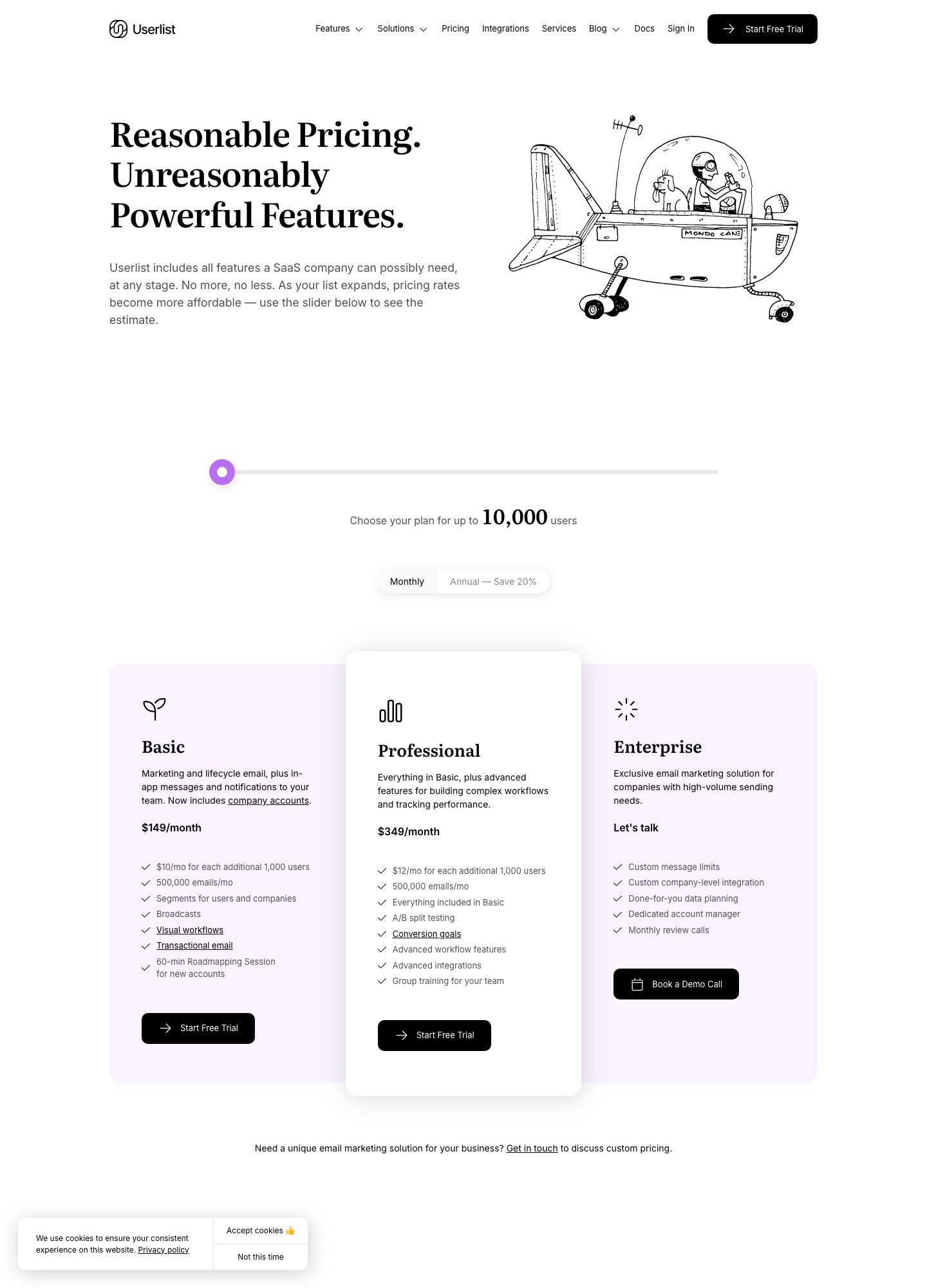
Basic is $149 a month for up to 10,000 users and Professional is $349, with $10 and $12 a month for each additional 1,000 users. The capture's slider sits at its left-hand end on 10,000, so the page shows no smaller stop, and an Annual toggle beside Monthly reads "Save 20%". The readings in this article use the Monthly toggle.
Five friction points that send teams looking
- The floor is 10,000 users. A pre-launch or early product with a few hundred users still sees $149 a month, and Userlist lists no free plan; its billing docs describe a 14-day free trial that is charged on the peak user count reached during the trial.
- The testing features sit on the dearer plan. The pricing page lists A/B split testing, conversion goals, advanced workflow features, advanced integrations and group training under Professional. From Basic that is 349 - 149 = 200 more a month, which is 12 x 200 = 2,400 a year for a plan that costs 349 / 149 = 2.3 times as much.
- The invoice follows your peak. The billing docs say the invoice reflects the highest tracked-user count of the previous cycle. An import of 4,000 old leads in week one sets the high-watermark for the whole period, and the docs' remedy is to delete users you no longer want to track.
- Messages are metered too. The same page gives every plan a message allowance of 5 times tracked users with a 500,000 floor, and $1 per 1,000 beyond it. The docs' own example is 200,000 users and 1,250,000 messages, which is 250,000 over and adds $250.
- Help is tiered by plan. The Basic card lists a 60-minute roadmapping session for new accounts, Professional adds group training for your team, and Enterprise, priced as "Let's talk", adds a dedicated account manager, done-for-you data planning and monthly review calls. A team that wants live guidance without a custom contract has Professional as its only published route.
One gap is worth checking before you assume it is a problem. The features page names the REST API, Ruby, Rails, JavaScript and PHP libraries, Zapier, Make and Segment as integrations, and names email and in-app messages as channels. It lists no push or SMS and no billing-system integration such as Stripe, so failed-payment or trial-ending triggers would come from your own code or an automation tool.
The shortlist at a glance
| # | Alternative | Pick it when | You give up |
|---|---|---|---|
| 1 | Customer.io | Testing and goals are why you pay for Professional | Managed deliverability and chat support on Essentials |
| 2 | Loops | Journeys follow one person and the bill is the issue | Company-level triggers, in-app messages |
| 3 | Bento | You want a small plan and vendor help with the move | A published company model |
| 4 | Encharge | Your sequences must sync with HubSpot or Salesforce | Price: it is dearer at 10,000 |
| 5 | Resend Marketing | Engineers also want transactional email in the same account | A lifecycle-first builder |
| 6 | Brevo | A/B testing matters and the list is modest | Product-event depth, a daily send cap on free |
The six, ranked
1. Customer.io: testing and goals without the Professional tier
Customer.io's pricing page lists A/B and multivariate testing, conversion tracking, send-time optimization and unlimited user seats on every plan, plus 2 object types on Essentials, which is how you keep companies as records. Essentials reads $100 a month at 5,000 profiles, $145 at 10,000 and $235 at 20,000. Set against Userlist Professional at 349 - 145 = 204 more a month for the same 10,000, that is the strongest case on this page. The cost is on the other side of the grid: managed deliverability, chat support, onboarding support and custom role permissions are marked "Not included" on Essentials. Both vendors bill on a peak, but the Customer.io billing docs count any profile that existed during the month, even one you later delete. The pairing is covered in Userlist vs Customer.io.
2. Loops: the cheapest route for person-level journeys
Loops' pricing page showed $48 for 4,788 subscribers, $99 for 9,998, $198 for 24,339 and $249 for 49,989, with a free plan for the 1,000 newest contacts and no seat fee. Its workflow docs list Trigger, Email, Timer, Audience filter, Branch and Experiment nodes, so the in-app messages you may use in Userlist have no equivalent, and the branching docs say workflows allow no circular paths, where Userlist lists looping. Moving to Loops saves 149 - 99 = 50 a month against Basic.
3. Bento: a small plan with a migration offer
Bento's pricing page lists Marketing Platform at $29 a month for up to 5,000 active users, then $0.01 per active user, with unlimited marketing sends, no seat fees and a 30-day trial. It says Bento helps relocate lists, forms, core automations, chat setup and transactional email, which is unusual among the vendors here. Active users are "subscribed users or people with an event in the last 30 days", so a product that fires many events counts more people than it has subscribers. The pages read here describe no company-level model.
4. Encharge: when the CRM is the other half of the job
Encharge's pricing page lists Premium, from $159 a month at 2,000 subscribers, with HubSpot, Salesforce and transactional email, and Growth from $99 with unlimited flows and team members. Encharge's monthly readings for 10,000 subscribers are $249 on Growth and $399 on Premium, both above the $149 of Userlist Basic, so this is a choice for the CRM link and a flow builder aimed at SaaS, not for a saving.
5. Resend Marketing: transactional and lifecycle in one account
Resend's Marketing tab read free at 1,000 contacts with 10,000 automation runs, then the slider shows $40 for 5,000 contacts, $80 for 10,000 and $180 for 25,000. If you use Userlist's transactional email for password resets and receipts, the transactional plans sit on the same pricing page: Resend's Free plan covers 3,000 emails a month at up to 100 a day, and its Pro plan lists 50,000 emails for $20 a month. The trade is that Resend is built for sending first, so test a company-level journey before you commit. Its Loops comparison shows the trade from the other side.
6. Brevo: A/B testing from a low entry price
Brevo's plan article says Standard starts at $18 a month and adds automation, A/B testing and advanced reports, against Starter from $9 and a free plan of 300 daily sends with 2,000 contacts in marketing automation. Brevo sets its tier by email volume rather than users, so a 10,000-user list on a light sending schedule can sit on a low tier, and a launch day can trip the cap. Nothing on those pages describes events or companies the way Userlist's features page does.
What the same list costs at 10,000 and beyond
US dollars a month, Monthly toggle where there is one. Counts: tracked users for Userlist, profiles for Customer.io, subscribed contacts for Loops, contacts for Resend. Where a vendor has no reading at a size the nearest one is named.
| Size | Userlist Basic | Userlist Professional | Customer.io Essentials | Loops | Resend Marketing |
|---|---|---|---|---|---|
| 10,000 | $149 | $349 | $145 | $99 (9,998 subscribers) | $80 |
| About 20,000 | $229 (18,000 users) | no reading | $235 (20,000 profiles) | $198 (24,339 subscribers) | $180 (25,000 contacts) |
| About 30,000 | $369 (32,000 users) | no reading | $325 (30,000 profiles) | $198 (24,339) or $249 (49,989) | $180 (25,000) or $250 (50,000) |
At 10,000 users, Professional against Customer.io Essentials is 349 - 145 = 204 a month, or 12 x 204 = 2,448 a year; Basic against Loops is 149 - 99 = 50 a month, or 600 a year. The middle row flatters Userlist slightly: its 18,000 users cost 6 less than Customer.io's 20,000 profiles (235 - 229), but by 32,000 users against Customer.io's 30,000 profiles the order reverses, 369 - 325 = 44 higher. Bento ($29 for up to 5,000 active users plus $0.01 per additional one) and Encharge ($249 for Growth at 10,000 subscribers, $389 at 25,000) are left out because they have no readings that line up.
Message volume can move the totals too. Userlist's 500,000-message floor means 50 messages per user at 10,000 users before the $1-per-1,000 rate applies, while Customer.io's Essentials grid lists 1 million emails a month with additional 1,000 emails at $0.12. A product that mails each user 60 times a month adds 100 at Userlist (600,000 - 500,000 = 100,000 over, at $1 per 1,000) and nothing at Customer.io.
Leaving Userlist: export, unsubscribed users and the code you must change
- Export users. Userlist's export docs say to open the Users page, optionally apply filters, click Export at the top right and confirm with Start Export. An email brings a download link. CSV is recommended for size and compatibility, and Excel is available.
- Export companies and segments separately. The same docs run the company export from the Companies page and a segment export by choosing the segment in the "All users" dropdown and clicking Export. They describe no file for the user-to-company links, so check that your user file carries a company identifier before you rely on it.
- Find the opt-in column. The docs say exports hold all relevant properties but do not name the field that records subscription status. Run a small test export, identify the column and confirm the unsubscribed count against the app before the full export.
- Mind the destination's import rules. Loops marks new contacts subscribed unless the file has a Subscribed column set to false, per its CSV upload docs, and Customer.io stores global unsubscribes in a reserved attribute named unsubscribed, per its unsubscribe docs. Map Userlist's opt-in field to the matching one before the first import.
- Plan for what is not exported. The export docs cover users, companies and segments, not workflows, in-app messages or split tests. Screenshot each workflow and write down triggers, waits, goals and loop conditions. The segment definitions need rewriting in the destination's own filter language.
- Move the transactional emails separately. The features page lists password resets, activity notifications and billing receipts as transactional email. Point those calls at the new sender and test them with a real address.
- Replace the tracking code. The features page says the integration is the REST API plus Ruby, Rails, JavaScript and PHP libraries. Find every place your app sends users, companies and events to Userlist, and switch them to the new tool's API calls.
A cutover calendar that respects the peak-based invoice
- Day 0: export users, companies and one segment. Do not delete anyone from Userlist, because the docs bill on the previous cycle's peak anyway.
- Day 2: import into the new tool with workflows off, and send the transactional emails from it to a test address.
- Days 3 to 9: rebuild onboarding first, then trial and activation journeys. Send events from the app to both tools from day 6.
- Day 10: new signups enter the new journeys. People inside Userlist workflows finish them there.
- Days 11 to 27: run both. Compare who entered each journey and fix filters that behave differently.
- Day 28: export users again to catch unsubscribes since day 0, load them into the new tool, turn Userlist workflows off and check the renewal. The billing docs say monthly plans charge roughly every 30 days and annual plans charge once a year for the base subscription, so an annual customer should time the move for renewal.
The migration guide covers the general order of a switch, and trial conversion tools for B2B companies helps decide which journeys to rebuild first.
Keep Userlist if
- Companies, not people, are your audience. Picture a B2B product whose onboarding starts when a second teammate joins a company and repeats until the account reaches an activation goal. The features page lists company join and leave triggers, company segments, looping and goals with custom time windows, and Loops' node list has no counterpart for that loop.
- You already pay for Professional and use all of it. If split testing and conversion goals are in daily use, the 204-a-month saving at Customer.io has to be set against a rebuild.
- Your message volume is far below the floor. With 500,000 messages included at 10,000 users, a light sender never meets the overage rate.
For other starting points, see all alternatives, the tool directory, Customer.io alternatives and Loops alternatives.
Frequently asked questions
How does Userlist count users for the bill?
Its billing docs say the invoice reflects the peak number of tracked users from the previous billing cycle, and that the high-watermark resets at the start of each new period. The amount is backward-looking, so a spike this month shows up on the next invoice. The page advises deleting users you no longer want to track to keep the count lower going forward.
When does Userlist charge for messages on top of the plan?
Every plan includes a message allowance equal to 5 times your tracked users, with a floor of 500,000 per billing period, and extra messages cost $1 per 1,000. At 10,000 users the floor applies, so a product that sends 60 messages to each user sends 600,000 and pays 100,000 / 1,000 = 100 dollars over. Check your own send volume before assuming the plan price is the whole bill.
Does a Userlist export show who has unsubscribed?
The export docs say a file includes all relevant user or company properties, but they do not name the column that holds opt-in status. Export a small segment first and confirm which field carries it. The features page also says you can send critical messages to unsubscribed users, so the status matters beyond marketing sends.
Is there a free plan to fall back on after Userlist?
Userlist itself offers a 14-day free trial rather than a free plan, and its docs say the trial is charged on the peak user count reached during it. Among the alternatives here, Loops has a free plan for the 1,000 newest contacts, Resend's Marketing tab is free at 1,000 contacts, and Brevo's free plan allows 300 sends a day. Each limit differs, so match them to your list size.
Can I keep company-level triggers if I move to Loops?
Loops' workflow docs describe contacts, contact properties, lists and events, and do not describe company records, so you would encode company state in properties you maintain. Customer.io lists 2 object types on Essentials and 10 on Premium, which is the closer match for accounts. Whichever you pick, rebuild one company-level journey first and confirm it fires for the right people.